Manage Personas
Purpose
You need a Persona to harvest content from sites that require login credentials, such as social media sites. A Persona stores login credentials by saving the cookies from a browser.
Once you have created a Persona, you can apply the Persona to a Harvest from the Query tab.
Requirements
To use this feature, the Sintelix Chrome Extension must be installed. See Install Sintelix Extension.
Security
If you have logged into restricted sites or used your own personal logins to access sites using the browser, ensure you control the security access to the Sintelix project. This will prevent unauthorised users from accessing the project, and performing harvests using your personal credentials. For information on controlling the project security, see Manage Project Security.
Access
To manage Personas, select Harvester > Personas
Create a Persona
At the bottom on the Personas tab is the option to Create a new persona.
Sintelix will identify the login credentials for the domains identified in the project Rule Sets. The example shows multiple Rule Sets for the facebook (FB) domain:
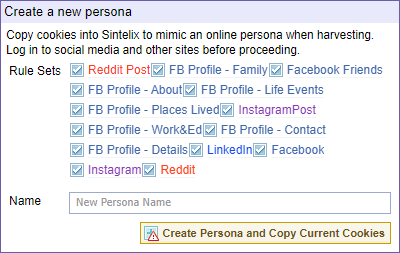
To create a new persona:
-
Unselect any login credentials you do not want to capture in the Persona
-
Enter a name for the Persona
-
Select the Create Persona and Copy Current Cookies button.
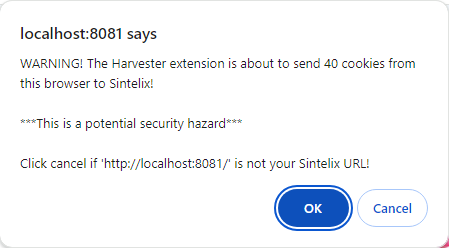
Result: A warning message is displayed to confirm you want to copy cookies into Sintelix.
-
Select OK to confirm.
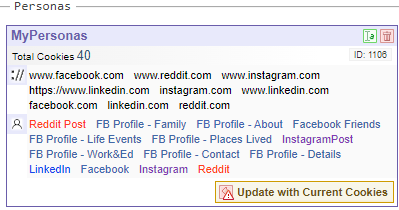
Result: Sintelix captures the cookies into the Persona. The Persona is now listed under the Personas section.
Update a Persona
As the cookies of social media sites expire, it is recommended to periodically (for example, monthly). The Persona will also need to be updated if a password has been modified.
For the Personas you want to update, select the Update with Current Cookies button.
Result: A warning message is displayed to confirm you want to copy cookies into Sintelix.
Select OK to confirm.
Rename a Persona
To rename a Persona, select the rename icon  .
.
In the Rename dialog, change the name and select Rename.
Delete a Persona
To delete a Persona, select the delete button  .
.
In the Delete Item dialog, select the Delete button to confirm.