When a Document Property is Present
Dialog
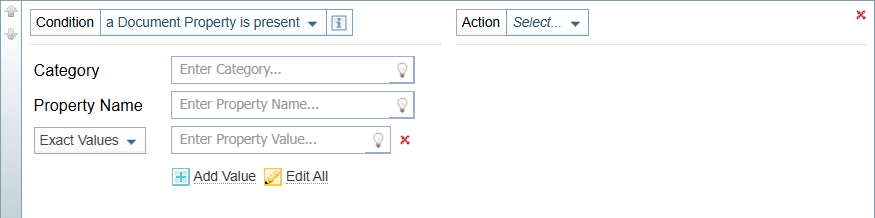
When a condition rule is based on a Document Property, the following fields are displayed.
Options
| Category |
Click the lightbulb
To familiarise yourself with the range of Document Properties and their values available, you view ingested documents and expand the Document Properties table displayed at the top of each document. An example of a Document Properties Table is provided at the bottom of this topic. |
| Property Name |
Click the lightbulb The Property Name is shown in the second column of the Document Properties table. |
Property Value Options  |
You can choose to have the property value set to:
|
| Exact Value | When the Exact Values option is selected, the Property Value field is displayed. Click the lightbulb Click the lightbulb  and select the property value required. and select the property value required. |
| Wildcards | When Wildcards is selected, the Wildcard Pattern field is displayed.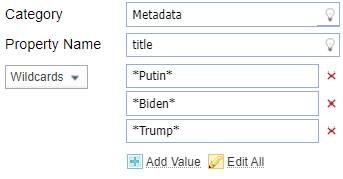 Enter the Wildcard Pattern required using ? to replace individual characters and * to replace more than one character.For example, "images*" will match any value beginning with images. Enter the Wildcard Pattern required using ? to replace individual characters and * to replace more than one character.For example, "images*" will match any value beginning with images. |
| Dictionary | When Dictionary is selected, you can choose a dictionary to either match:any value in the dictionary word list, or a single value in the dictionary. |
|
Add Value
|
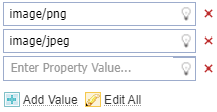
When you can define multiple values, the Add Value option is displayed.
Select the Add value option to add another field.
|
|
Edit All
|
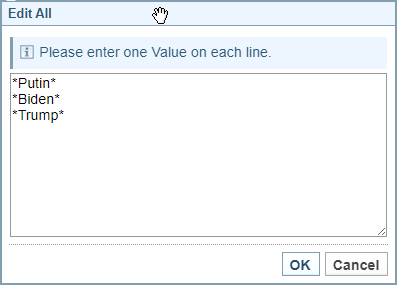
When you can add more than one value, the Edit All option is displayed.
To add or edit all the values at once:
|
|
Red x icon |
Click the red x icon  to remove any unwanted value. to remove any unwanted value. |


Document Properties
When you view a document that has been ingested, the Document Properties are shown in a table at the top of the document.
Below is an example of Document Properties. The actual document properties can vary from project to project, depending on the configuration settings.

Example: Document Properties table
| Metadata | title | Putin to chair Russia Security Council meeting after humiliating explosion on strategic Crimea bridge - Local News 8 |
|---|---|---|
| Metadata | content_type | text/html |
| Metadata | publication_date | Mon, 10 Oct 2022 01:00:00 |
| External | Harvester Rule Set | News |
| Native | article:published_time | 2022-10-09T16:46:42+00:00 |
| Native | generator | WordPress 5.9.3 |
| Native | language | en |
| Native | msapplication-TileImage | https://localnews8.com/wp-content/uploads/2019/11/KIFI-Favicon.png |
| Native | og:description | By Darya Tarasova and Amy Woodyatt, CNN Russian President Vladimir Putin will hold an operational meeting of his Security Council on Monday, just two days after a massive explosion on a key strategic bridge linking Crimea and Russia. The meeting itse... |
| Native | og:image | https://localnews8.b-cdn.net/2020/12/Joint-KIFI-Local-News-8-and-MIFI-Eyewitness-News-3-Now-logo-scaled.jpg |
| Native | og:image:height | 1441 |
| Native | og:image:width | 2560 |
| Native | og:locale | en_US |
| Native | og:site_name | Local News 8 |
| Native | og:title | Putin to chair Russia Security Council meeting after humiliating explosion on strategic Crimea bridge - Local News 8 |
| Native | og:type | article |
| Native | og:url | https://localnews8.com/news/national-world/cnn-europe-mideast-africa/2022/10/09/putin-to-chair-security-council-meeting-after-humiliating-explosion-on-strategic-crimea-bridge/ |
| Native | robots | index, follow, max-snippet:-1, max-image-preview:large, max-video-preview:-1 |
| Native | twitter:card | summary_large_image |
| Native | viewport | width=device-width, initial-scale=1 |
| System | pipeline_lang | en |
| System | pipeline_name | English |
| System | time_processed | Thu, 4 Jan 2024 11:09:43.567 GMT±0 (Europe/London) |
| Metadata | Date_within_Article | false |
| Metadata | publication_date_set | true |
| Metadata | token_count | 1115 |