Manage Datastore Locations
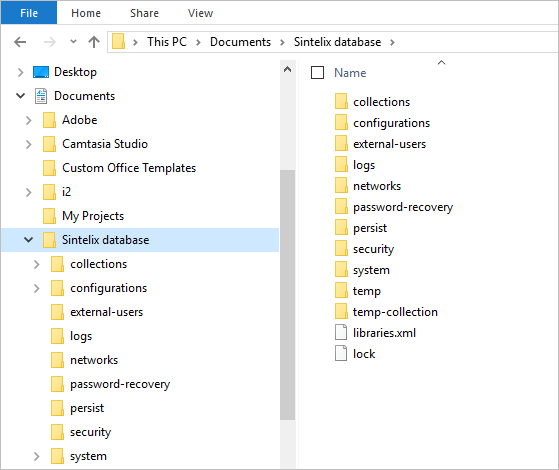
By default, Sintelix stores all networks A container that stores information in nodes and links. See Nodes and Links topic for more information and document collections Once source data has been ingested, the resulting Documents are stored in a Collection. Once Documents are stored in a Collection, you can browse, search and edit Documents. Only text-based Documents is stored in Collections, not the original source files. in the directories ‘networks’ and ‘collections’ in the <Sintelix database directory> The directory in which the Sintelix database is stored, for example, C:\Users\Documents\Sintelix database., as specified in WEB-INF/config/site-config.xml, under entry <data-directory>.
The database locations configuration is not configurable from the GUI. File system access to the server is required.
You can expand the disk space available to Sintelix by adding more locations on the file system for Sintelix datastores.

Viewing datastore locations
Configured datastores are listed the System Overview pane.
To view datastore locations:
- Log in to Sintelix as an administrator.
- On the Main Navigation Bar click the Status tab.
- On the System Overview pane, under System Configuration, find the Datastores row.
Each entry shows the path, the total disk space used, the remaining disk space available and the number of collections and networks stored at each datastore. Clicking on the number of collections or networks shows a detailed summary of which networks or collections are present and how much disk space each of them occupies.
If no new collections/networks will be automatically created in a datastore (writeable="false"), a padlock icon is displayed.
Adding a datastore location
To add more datastores:
- Go to the directory <Sintelix database directory> The directory in which the Sintelix database is stored, for example, C:\Users\Documents\Sintelix database.
- Create a file called storages.xml with the following contents:
Copy
<root>
<ext-data-directory writeable="true" forDocuments="true" forNetworks="true">D:\secondary-db\</ext-data-directory>
<ext-data-directory writeable="true" forDocuments="true" forNetworks="true">E:\tertiary-db\</ext-data-directory>
</root> - Restart Sintelix for the changes you made to storages.xml to take effect.
There can be any number of ext-data-directory elements.
writeable is a flag which specifies whether Sintelix writes to that data store (if it’s set to false, Sintelix will accept networks or collections found there on startup, but will not add more data there).
forDocuments is a flag which tells Sintelix that this datastore should be used for document collections.
forNetworks is a flag which tells Sintelix that this datastore should be used for networks.
Sintelix accepts an arbitrary number of datastore locations. If there is a choice, any new collection and network will be created in the datastore that has the smallest total disk usage at the time of creation.
If external datastore locations are specified and at least one of them specifies writeable="true", then no new collections or networks will be created under the main storage (as if the main storage became writeable="false").
Moving data between datastores
If Sintelix is configured to not create any new collections/networks in the datastore (writeable="false") then this process is the only way to populate such a datastore.
If there is more than one datastore with the same ID (for example if data was accidentally copied instead of moved), Sintelix will not start, to prevent any data loss.
Do not start the Sintelix server while the move is in progress. Sintelix can delete partially-moved databases during startup.
To move a collection or network between two datastores:
- Log in to Sintelix as an administrator.
- On the Main Navigation Bar click the Status tab.
- On the System Overview pane, under System Configuration, find the Datastores row.
- Identify the ID of the collection or network you want to move and the datastore it is in.
- Stop the Sintelix service (see Start, Stop and Restart Sintelix).
- Go to the filesystem location of the source datastore and enter the "collections" or "networks" directory. Find the directory with the name corresponding to the ID of the collection or network you want to move.
- Identify the filesystem location of the destination datastore and its "collections" or "networks" directory.
- Move the directory, and all files in it, from the source to the destination datastores.
- Start the Sintelix service.
The System Overview pane should now confirm that the network or collection is now present in the new datastore.