Ingestion, Ontology and Network Creation
The Ingestion, Ontology and Network Creation configurations in integrally linked. It is helpful to understand how they interact.
Summary
Rules Summary
The key rules to remember are summarised below:
-
Collection default Ingestion configuration: Every Collection has a default Ingestion configuration. When you select a Collection when harvesting or loading documents, the Collection default Ingestion configuration will be applied.
-
Collection Ontology: The Collection default Ingestion configuration identifies the Ontology applied to the Collection. The Ontology controls how Text References, Entities and Links are displayed in Documents.
-
Networks: The Ingestion configuration identifies the Network(s) created/updated when loading data into the Collection.
-
Network Ontology: The Ingestion configuration first used to create a Network sets the Network default Ontology configuration. You cannot change the Network default Ontology. Instead, you need to Re-create the Network.
-
Ontology Best Practice: To avoid conflicts, have one Ontology per Project.
Simple Structure
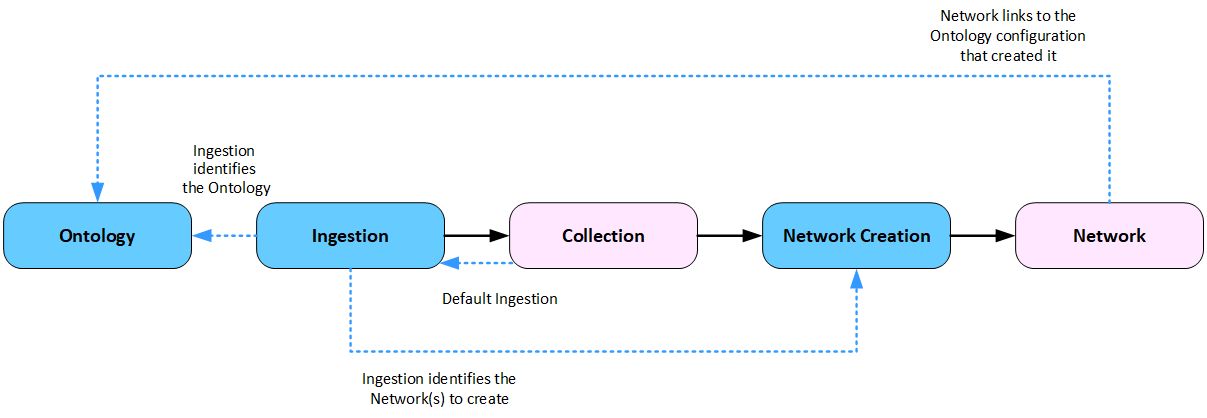
The diagram below shows a simple structure with one Collection loading data into one Network.
Load Structured Data - Simple Structure
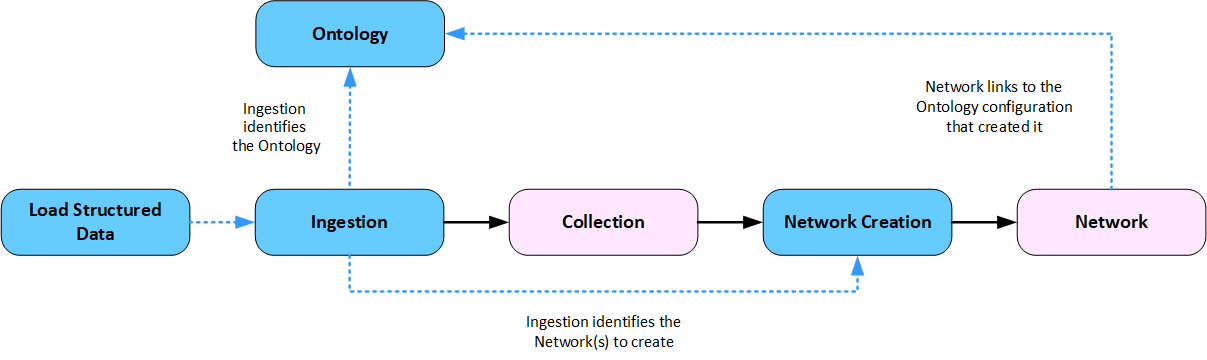
The diagram below shows loading structured data into a Collection which populates one Network. When loading structured data, you select a Load Structured Data configuration which incorporates an Ingestion configuration.
Structure Options
Structure Options
You can structure an analysis in different ways. For example, you can have:
|
One-to-one: |
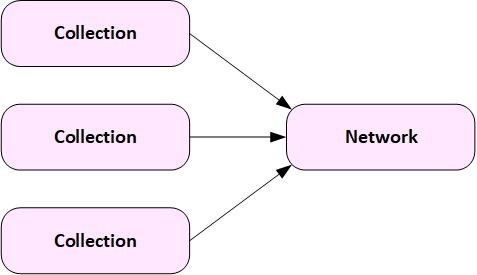
Many-to-one: |
|
One Collection feeding data into one Network.
|
Multiple Collections feeding data into one Network.
|
|
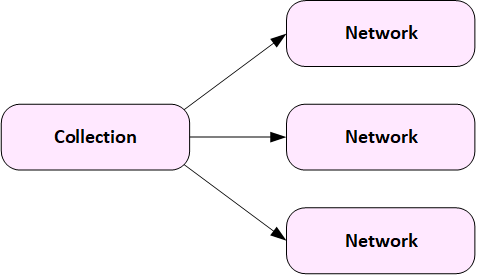
One-to-Many: |
Many-to-many: |
|
One Collection feeding data into multiple Networks.
|
Multiple Collections feeding data into multiple Networks.
|

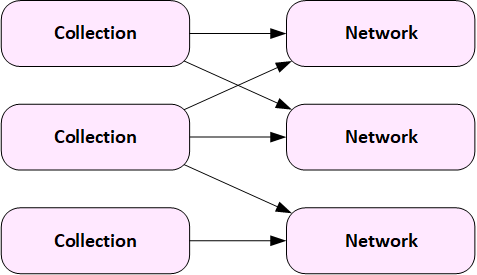
Understanding how the Ingestion, Ontology and Network Creation configurations interact between Collections and Networks can help you decide how best to structure your analysis.
Detailed Rules
Collections
-
Create: When you create a Collection, you choose an Ingestion configuration. This becomes the default Ingestion configuration.
-
Load Unstructured Data: When you load unstructured data into an existing Collection (Add Documents or Harvest from the web), the Collection default Ingestion configuration is used.
-
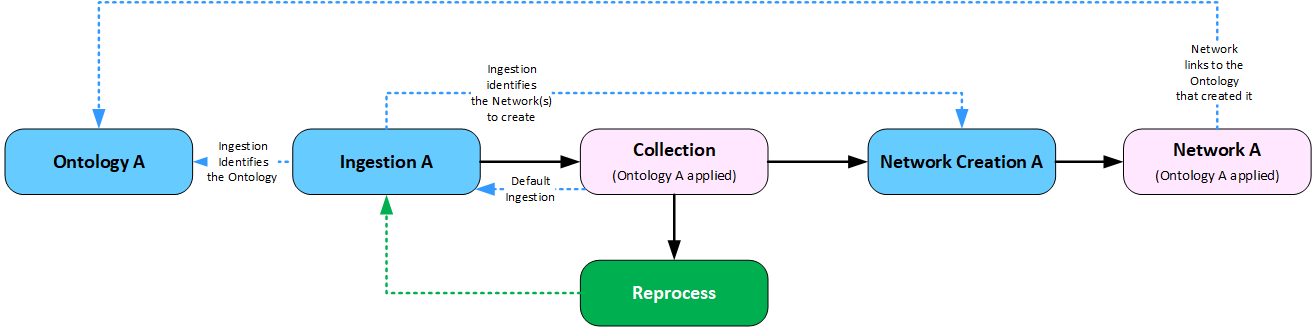
Reprocess: When you select the Reprocess option within a Collection, the Text Reference, Entities and Links are removed from the Documents and the Network(s). Text References, Entities and Links identified are regenerated and populated into the Network(s). Useful for updating a Collection and associated Networks with changes to the configurations.
-
Ontology: The Ontology configuration linked to the default Ingestion configuration is used to display and edit Entities, Text References and Links.
-
Change: You can change the Collection default Ingestion configuration, which will be applied when harvesting or loading documents.
-
Load Structured Data (Exception): When loading structured data, an Ingestion configuration is linked in the Load Structured Data configuration. It is applied to any data added to Documents stored in the Collection. It can be different to the Collection default Ingestion configuration.
Networks
-
Create: The Network Creation configuration linked to the default Ingestion configuration for a Collection is used to create and reprocess a Network.
-
Default Ontology: Every Network has a default Ontology configuration. The Ingestion configuration first used to create a Network sets the Network's default Ontology configuration. You cannot change the Network default Ontology configuration. Instead, you need to Re-create the Network.
-
Warning: A warning is displayed if you choose to load data into a Network using an Ingestion configuration which links to a different Ontology to the Network default Ontology. Data loaded into a Network using a different Ontology to the Network default Ontology will be displayed using the default Ontology, which may give unexpected results.
-
No Collection: When harvesting or loading data, you can choose not to store Documents in the Collection, instead data is published directly to the Network. In this case, you will need to select the Ingestion configuration to apply when loading the data.
Ontology
Since the Ontology controls how data is visualised in both Collections and Networks, it is important to have a single Ontology applied to one analysis task.
A simple way to avoid conflicts, is to have one Ontology per Project.
Diagrams
The following diagrams illustrate how the configurations interact when you apply different ways to structure your Collections and Networks.
Diagram: Simple Structure - No Network
The diagram below shows a simple structure with one Collection loading data into one Network.

Diagram: Simple Structure - Reprocessing
The diagram below shows a simple structure with one Collection loading data into one Network.
Caution
If you change the Collection default Ingestion which is linked to a different Ontology, and then Reprocess the Collection, data populated into the linked Network(s) will still be linked to the Ontology that originally created the Network, as illustrated below.
To avoid the conflict, delete the Network before reprocessing the Collection. When the Collection is reprocessed, the Network will be recreated.
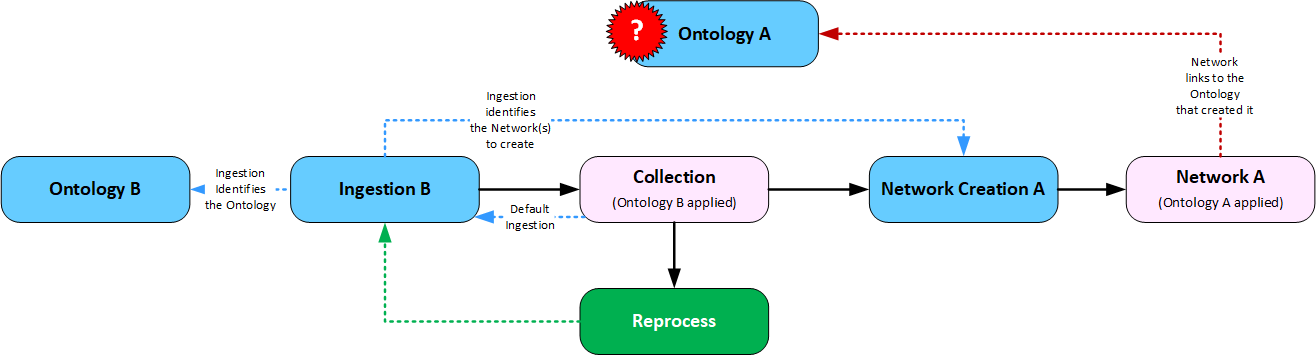
Diagram: Many to One Structure
The diagram below shows two Collections loading data into one Network.
This can be useful when loading data from different sources, which you may want to apply different Ingestion rules to, but still want to analyse in one Network.
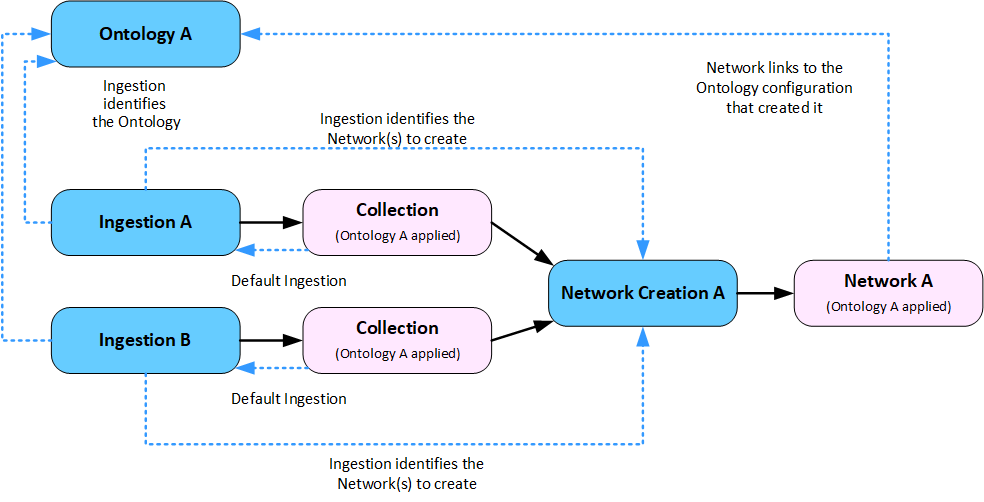
Note
In this diagram, both Ingestion configurations link to the same Ontology.
Diagram: One to Many Structure
The diagram below shows a single Collection loading data into two Networks.
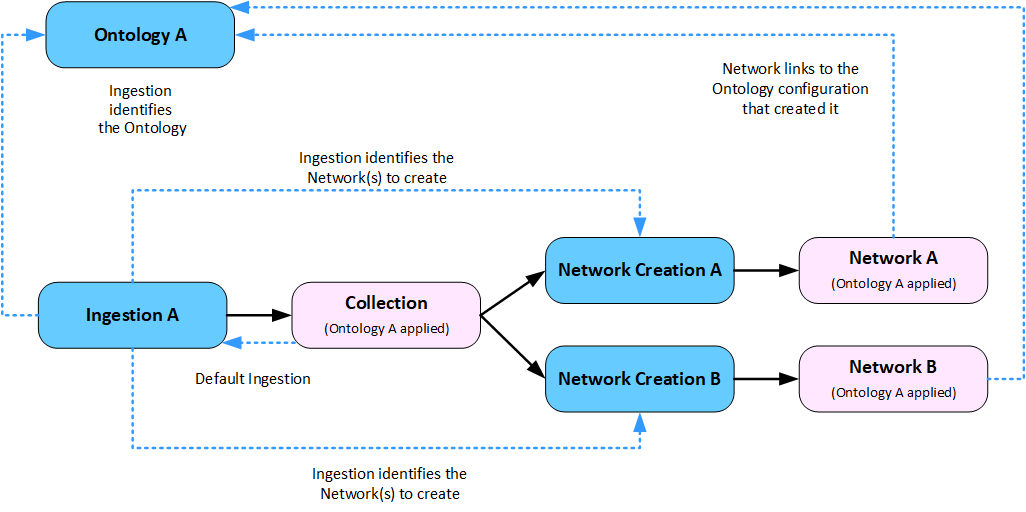
Diagram: Many to Many Structure
The diagram below shows a more complex structure with multiple Collections loading data into multiple Networks.
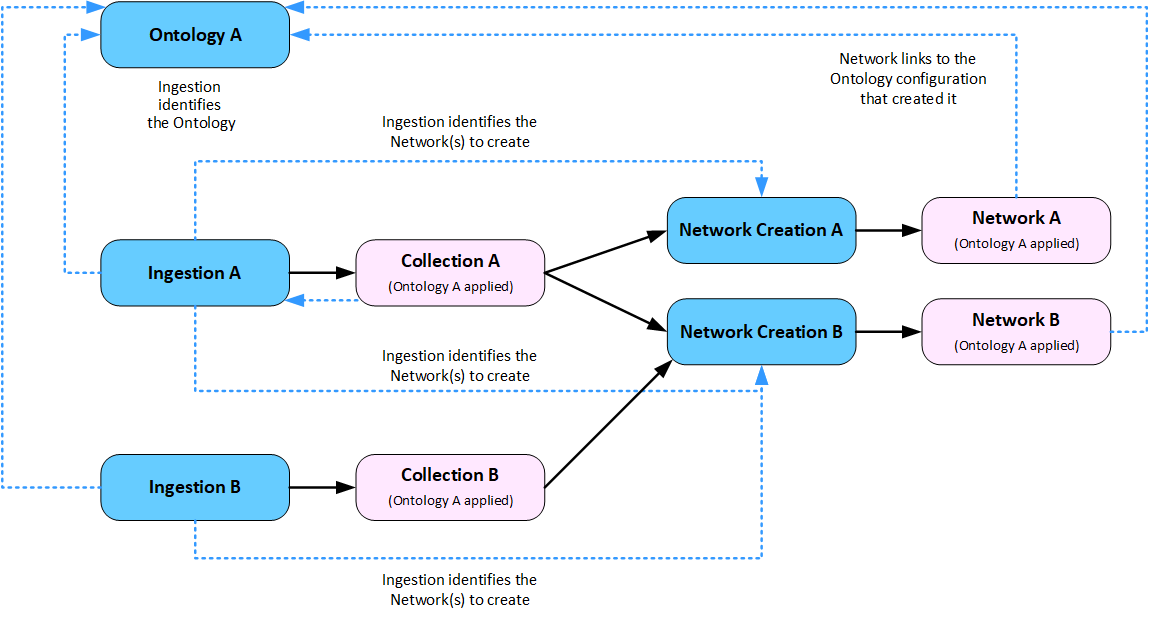
Diagram: Many to Many Structure - Potential Conflict
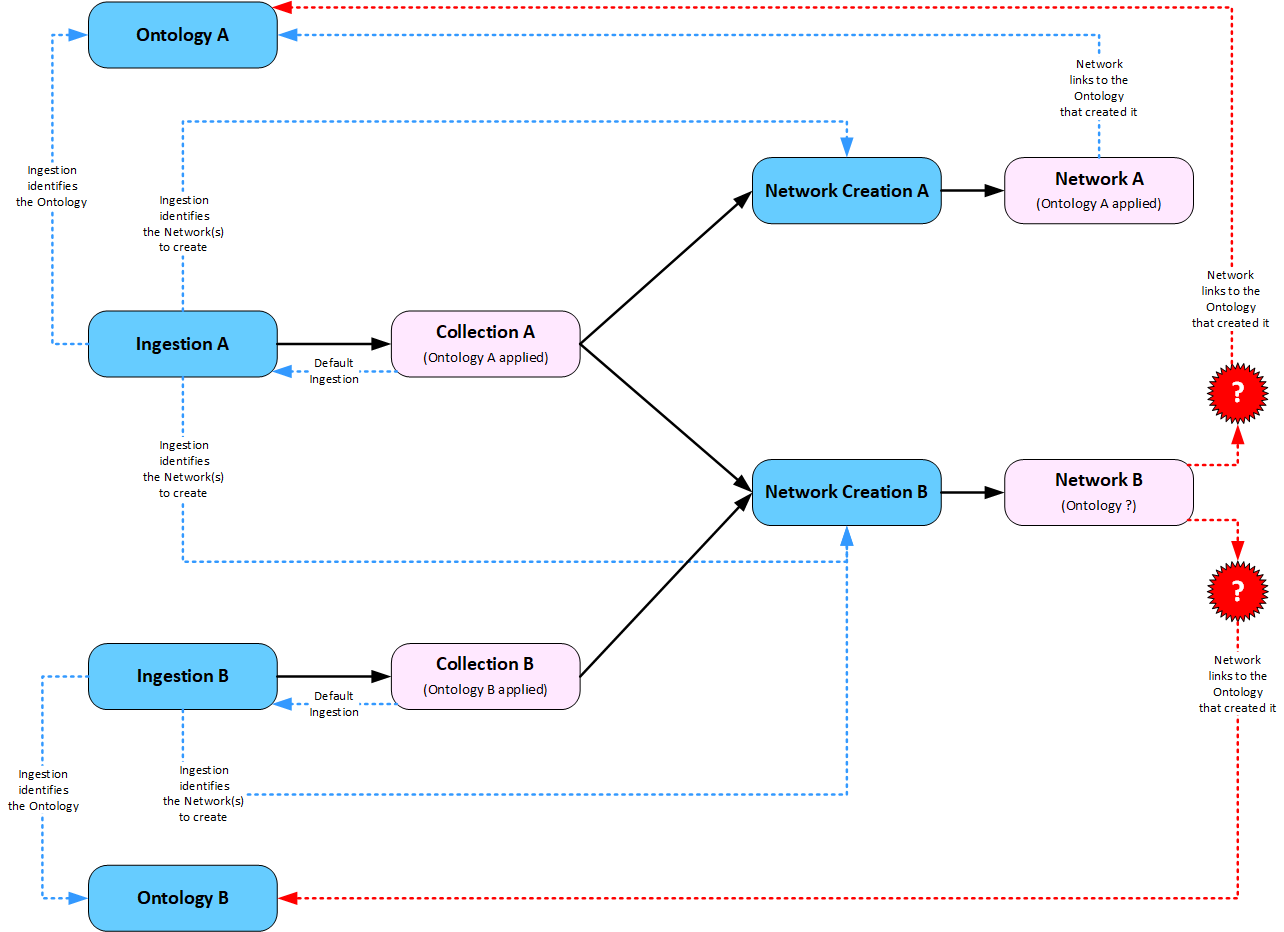
The diagram below shows a more complex structure with multiple Collections loading data into multiple Networks. However, the two Collections have different Ingestion configurations linking to different Ontologies.
The default Ontology applied to Network B will depend on which Collection is used to first create the Network.
Changing the Default Ingestion Configuration
Every Collection has a default Ingestion configuration assigned.
You can change a Collection's default Ingestion configuration.
Warning
If you change the Ingestion Configuration with a different Ontology after Documents have already been added into a Collection, you may get inconsistent results when viewing Documents or any linked Networks.
Recommended Practice
If you need to use different Ingestion configurations, create a separate Collection for each configuration. These Collections can still be populating a single Network.
Have a single Ontology for the Collections feeding into a Network, to ensure consistent results in Networks.
For example, you may have a separate Collection for:
-
structured data from a database
-
information harvested from the Internet
-
reports ingested in PDF format.
all feeding extracted information into a single Network.
The Ontology assigned to a Network is the Ontology in the Ingestion configuration used to create a Network. Once a Network has been created, you cannot change the Ontology. To use a different Ontology, you would need to delete the Network and reprocess the Collections feeding the Network.
If you have added structured data into a Collection and have not retained the Documents, you will need to reload the structured data into the Network.