Apps
What is an App?
An app uses the power of Sintelix to create pre-configured solutions.
What is a Solution?
A solution:
- Is a special type of project, stored in a Project File.
- Has a custom user interface accessed under the Apps tab.
- Has built-in help pages to assist users.
Availability
If Apps are enabled for your Sintelix release, you will see an Apps tab on the main menu.
Types of Solutions
The current and planned Solutions include:
GlobalEye
Surveys the news from 12,000 news outlets worldwide. Captures events related to Locations and Topics of Interest.
OSINT Flow
Collects information from the Internet with a focus on Social Media. Able dig to find originators and influencers and to discover the hidden Social Media story.
Autoscribe
Full featured transcription with easy tracking and edit capability. Extract entities and topics of interest.

Installing a Solution
To install a Solution, simply import the Project File.
See Import a Project for more information.
Accessing a Solution
Once a Solution has been installed, it is shown as a Project. To access the Solution, you can:
- select the Project which will automatically launch the Solution, or
- select the Apps tab which will either:
- automatically launch the Solution (if it is the only Solution available), or
- show a list of Solution for you to select from.

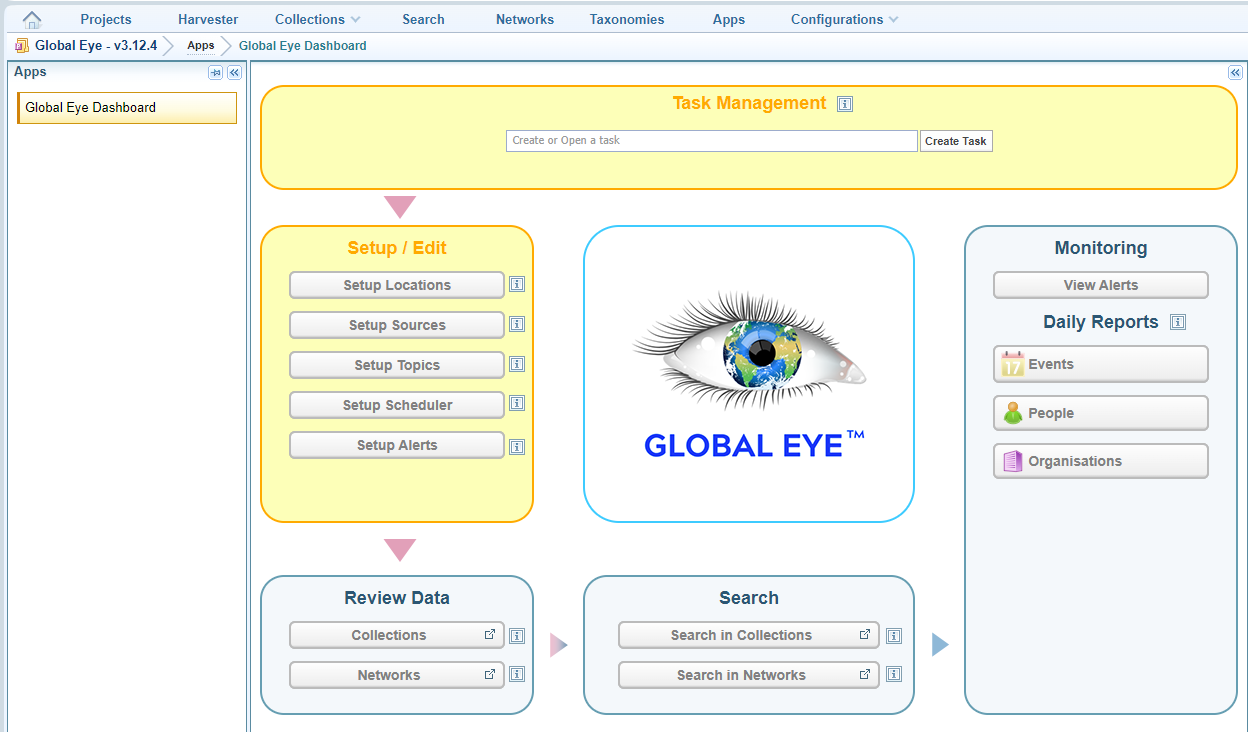
Using a Solution:
Each Solution has its own unique Control Panel and functionality.
When a Solution opens, you will see the right panel includes help explaining how to use that Solution.
App configuration:
App configuration provides the capability to design custom Solutions. App configuration is currently not available to users.
Sintelix Engineers can develop Solutions unique to an organisation's requirements. Contact Sintelix for more information.
Scheduling App Tasks
A Solution may have tasks available for scheduling. These tasks will be unique to each Solution.
See Schedule App Tasks for more information.