External Document Services
Introduction
The External Document Services configuration links Sintelix to third party services via HTTP GET and POST request methods.
What is it?
HTTP requests allow you to communicate with another website.
The POST method allows you to send information to a URL. For example, the Google Translate POST configuration sends a document to be translated on the Google Translate site.
The GET methods allows you to get information from a URL.
There are several sources of information about HTTP GET and POST requests available on the Internet, including: HTTP request methods and Difference between HTTP GET and POST Methods.
What it Does
When viewing a Document in the Documents Pane, there is an External Services dropdown.
External Document Services configurations are listed under this dropdown, using the name of the configuration.
To access the service, a user simply selects the name from the dropdown. Sintelix comes with the >Google Translate service pre-configured.
Access
Select Configurations > External Document Services.
Manage
See Manage Configurations for guidelines on creating, editing, copying, renaming, exporting and importing configurations. .
Pre-Configured
Sintelix includes a pre-configured configuration for Google Translate. You can use this configuration as an example for creating new configurations..
Requirements
All HTTP requests required:
-
the URL for the website
-
the type of request: GET or POST
-
the parameters that let's the target URL know what you want. The parameters required will be specific to the URL you are communicating with.
To create an External Document Service with a another website, you will need to be familiar with their HTTP request protocol.
Screen:

Example
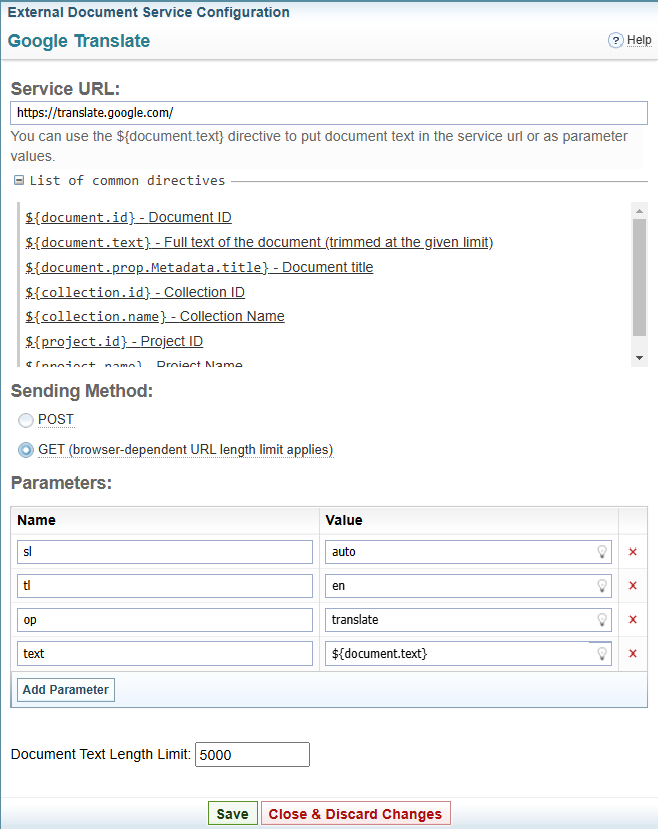
An example of the External Document Services pane is shown below:
Sintelix Parameter Values
Below are directives that you can use within the parameters to supply Sintelix specific information. These are visible by expanding the  List of common direction section on the pane.
${document.id} - Document ID
${document.text} - Full text of the document (trimmed at the given limit)
${document.prop.Metadata.title} - Document title
${collection.id} - Collection ID
${collection.name} - Collection Name
${project.id} - Project ID
${project.name} - Project Name
Instructions
To create an External Document Service:
-
Enter the URL in the Service URL field.
-
Select the Sending Method: POST or GET.
-
Complete the required Parameters:
-
the name and value of the parameters will be specific to the URL you are communicating with.
-
the list of common directions gives you the code to include Sintelix information in the parameter. For example, the ${document.text} will send the text of the document.
-
Select to add a new row to the list of parameters.
-
Select
 to remove a row from the list of parameters.
-
-
Enter the maximum text length.
When sending the document text in the request using the ${document.text} directive, you can limit the length of the post.
-
Select .