Define the Default Security Metadata Rules
When a user adds a new document or creates a new collection Once source data has been ingested, the resulting Documents are stored in a Collection. Once Documents are stored in a Collection, you can browse, search and edit Documents. Only text-based Documents is stored in Collections, not the original source files., this content is unrestricted and does not contain any security metadata.
Default security metadata rules are used to automatically assign security metadata to new documents and collections that are created by users.
The security metadata that gets assigned is dependent on the default security metadata rules and the security privileges of the active user.
Child element tags
|
Tag |
Description |
|
|---|---|---|
|
|
Default security metadata rules are defined with There is only one rule type that is used under default security metadata. It is assigned using the following |
|
|
|
|
Assigns the values of a security privilege property to a security metadata property of a new Document or Collection. |
|
|
The This is done by entering the |
|
|
|
The This is done by entering the |
|
Code examples
|
Task |
Code example and Sintelix UI output |
|---|---|
|
Create a default security metadata rule that automatically assigns a user's security privileges to new Documents and Collections. |
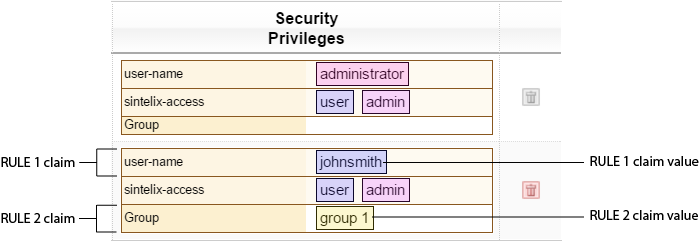
The default security metadata rules will assign the active user johnsmith 's security privileges to any new Documents or Collections he creates. Sintelix UI output: Security Privileges : Admin > Manage User Accounts > Users authenticated by Sintelix > Security Privileges column
|
|
|
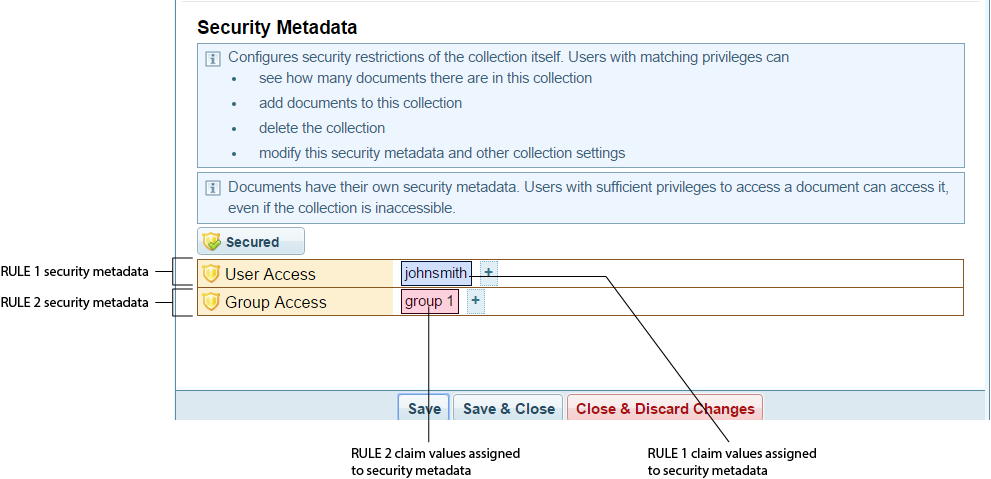
Security Metadata : Security metadata is automatically entered when the user johnsmith creates a new Collection. Collections > Collection > Collection Configuration > Security Metadata pane
|