Nodes
Nodes exist within a Network.
A Network is a structured schema made up of nodes and links.
Node Type
There are different types of nodes:
-
Entities - Entities are extracted from Documents.
-
Documents (optional) - Source files are ingested and standardised to become Documents in a Collection. You do not have to include Documents as a Node Type in a Network, you can disable this option in the Network Creation configuration.
Links represent a connection between two nodes.
Attributes
Nodes and Links can both have attributes, including:
-
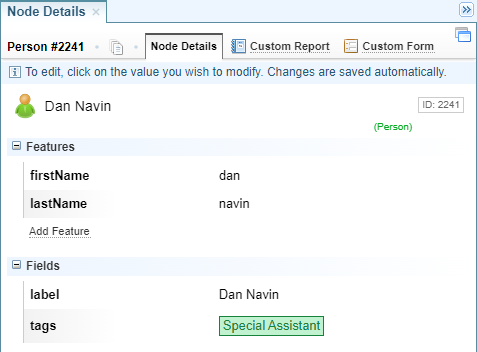
Features - Created by merging features from source Entities extracted from Documents.
-
Fields - Created when Nodes are created.
-
System Fields - Created by the system and are read-only.
Features
Features are created by merging features from source Entities extracted from Documents.
Features provide additional information about the entity/link.
Features are created during Ingestion by Entity Extraction, Dictionaries and Entity Extraction Scripts.
Features in Nodes are created by clustering the features of the
Features are flexible, allowing you to add, edit and delete features.
Fields
Fields are created when Nodes are created in a Network. They can be created from entity features, document metadata and neighbouring entities/links in the Network Creation configuration and using Entity Extraction Scripts.
The values in the fields can be edited.
However, fields are not flexible, you cannot add or delete fields.
If you add a new Node Type or as a new Field to a Node Type in a Structured Import or Network Creation configuration, you need to delete the existing Network and reprocess the Network.
Comparing Fields and Features
The table below compares Fields and Features:
|
Attribute |
Features |
Fields |
|---|---|---|
|
Applies to |
Entities and Nodes |
Nodes only |
| Created |
During Ingestion as part of Entity Extraction, usually from Dictionaries and Entity Extraction Scripts configurations. During Network Creation, by merging the Features from the source entities. |
During Structured Ingestion and Network Creation (both Structured and Unstructured). Created by Field Path Notation identifying information to collect from Features or Document Metadata. |
| Add or Delete | Yes, you can add and/or delete features. |
No, you cannot add and/or delete fields. They are built into the structure of the Network when it is created. |
| Editable | Yes, most features are editable. | Yes, most fields are editable. |
Configurations: Creation
The configurations that directly impact what Nodes are created include:
-
Network Creation defines:
-
which entities are created as Nodes in the Network.
-
if Documents become Nodes in the Network.
-
what fields are created when a Node is created.
-
-
Ontology defines:
-
how Nodes appear on Network Graphs.
-
-
Structured Import:
-
what Nodes are created from Structured data.
-
What fields are created for Nodes.
-
-
The Nodes created in a Structured Import must also be enabled in the Network Creation configuration.
-
The Node fields created in a Structured Import must match those defined within the Network Creation configuration, otherwise a conflict can occur do to a mix-matched data schema.
Configurations: Viewing
The configurations that control how you view Nodes include:
-
Ontology defines:
-
how Nodes appear on Network Graphs
-
sets the default Table View and Timeline View.
-
sets the default Network Custom Templates for Report, Edit and Create forms for the node.
-
-
Network Table Views defines the columns to display in the Node Table View.
-
Network Timeline Views defines the default Timeline Template to display in Timeline View.
-
Network Custom Templates defines the layout of the view for the Node Report, Edit form and Create form.
Nodes in the Network Graph
When you view the Network Graph, you see a node represented as a circle with an icon or an image.
Node Details and Report
Right click on the Node to display the node menu and then select View, Edit & Custom Report.