Expand the Network
Quick Summary
You can expand an existing Network by analysing and grouping related nodes and links – called Network Expansion.
For example, we can identify:
-
Communities - groups of people (usually) with the similar network neighbours
The communities are not related to friendship or organisational alignment, but are based on analysing the links connecting nodes and finding Persons with common connections.
-
Email Threads
-
Topics by grouping key phrases found in Documents
-
Link Aggregation by grouping the links between specified nodes and calculating the total count, total strength or neighbour overlap.
Configurations
To configure Network Expansions, see Network Expansion.
Expand the Network
To run Network Expansion:
-
Select Network Expansion

Result: The Network Expansion Configuration dialog is displayed
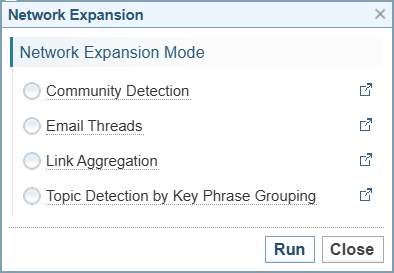
The Network Expansions will only show if there are the required nodes or links within the Network. For example, if there are no Person entities, the Community Detection option will not be shown.
The Link Aggregation option is the default Link Aggregation configuration in Sintelix. Other Link Aggregation options will be listed under the name of the configuration (if any have been created). See Link Aggregation for information on creating Link Aggregation configurations.
-
Select the type of Expansion configuration required.
-
Select the button.
Result: A message is displayed while the Network Expansion is processing.

Once processed, depending on the configuration selected, the following entities (nodes) are created:
-
Community Detection adds the Community entity:

-
Topic Detection by Key Phrase Grouping adds the Top and Key-phrase entities:
 and
and 
-
Email Thread adds the Thread entity:

-
Aggregated Links adds the Aggregated Link link:

-