Field Path Notation Syntax
The following details the Field Path Notation syntax. The Cheat Sheet summarises the field path notation syntax. More detailed examples are provided later in the topic.
Fields
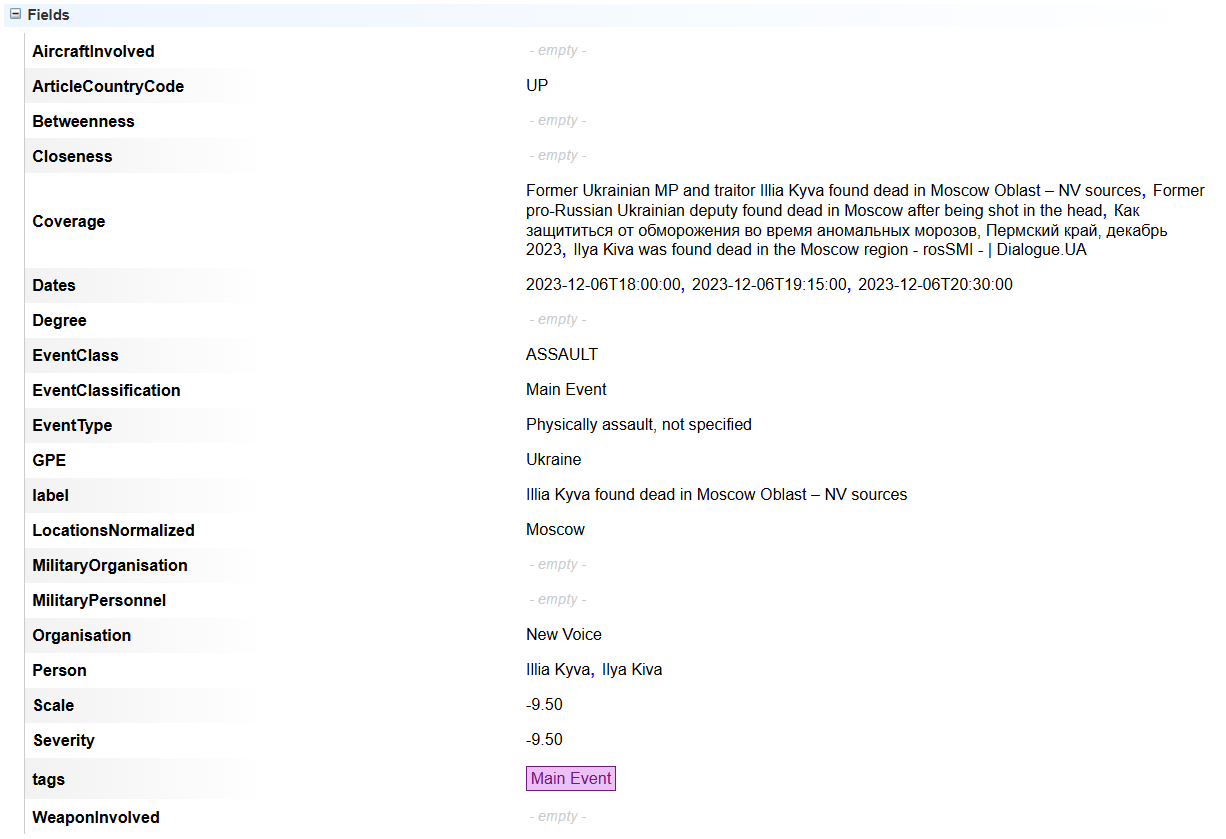
To get the value of a field, use the field name.
By default, Sintelix creates the label and tags fields. Other fields can be created using the Network Creation configuration and Entity Extraction Scripts.
|
Syntax |
<Field Name>
|
|
|
Examples |
label
tags
|
|
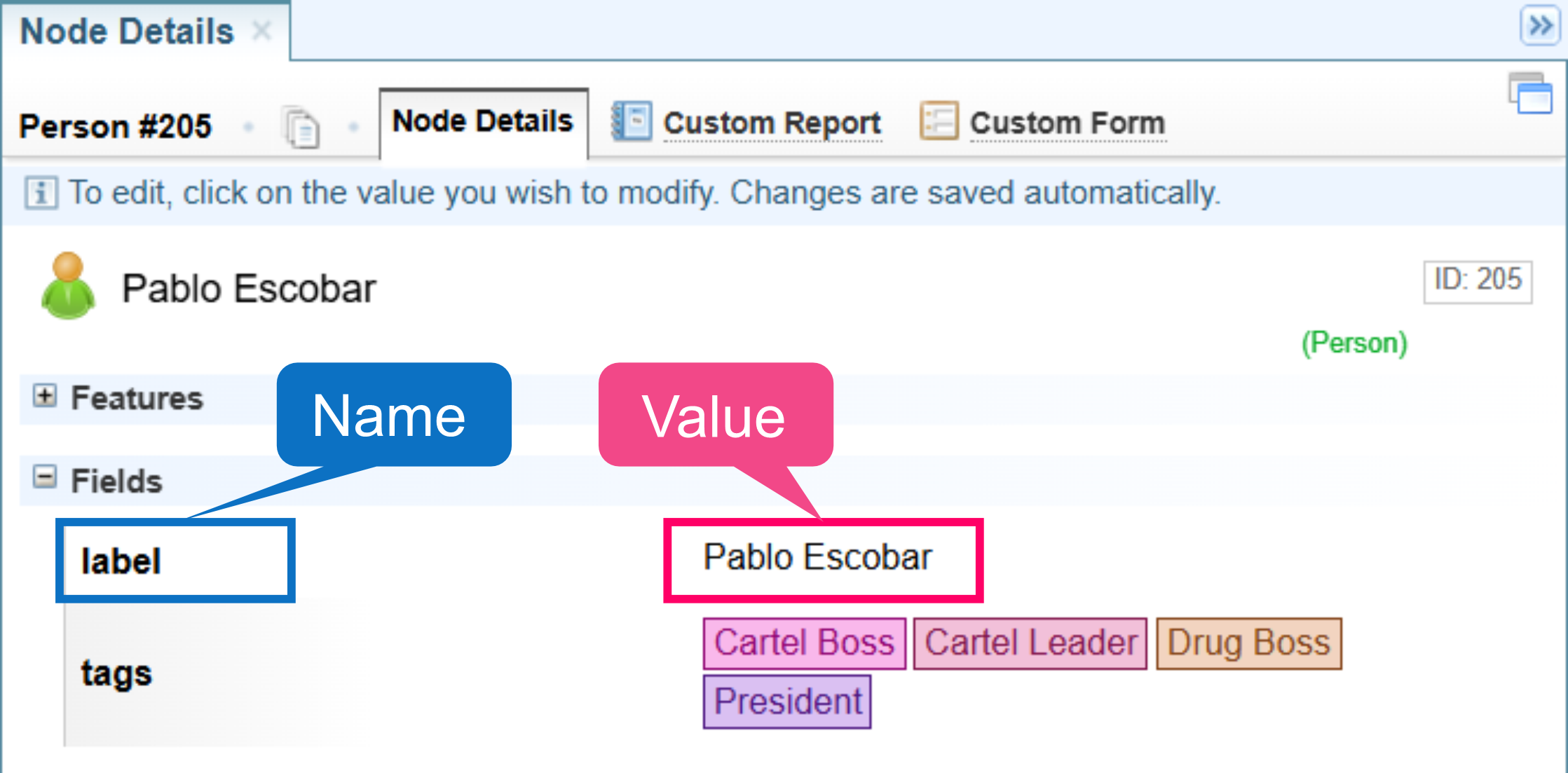

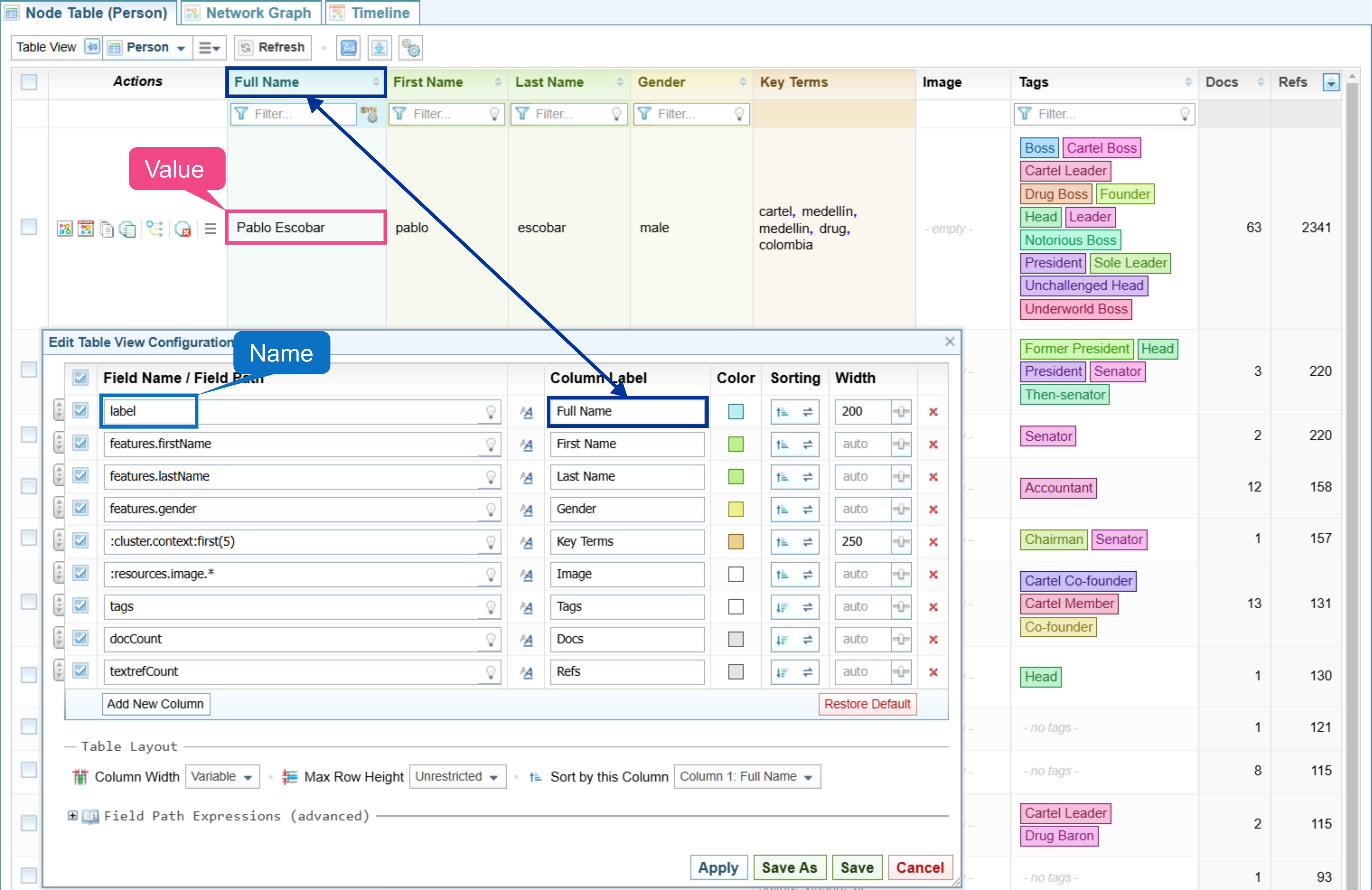
Table Edit Example
The example shows the field path notation used when editing a Table View (see Edit Table View Configuration).
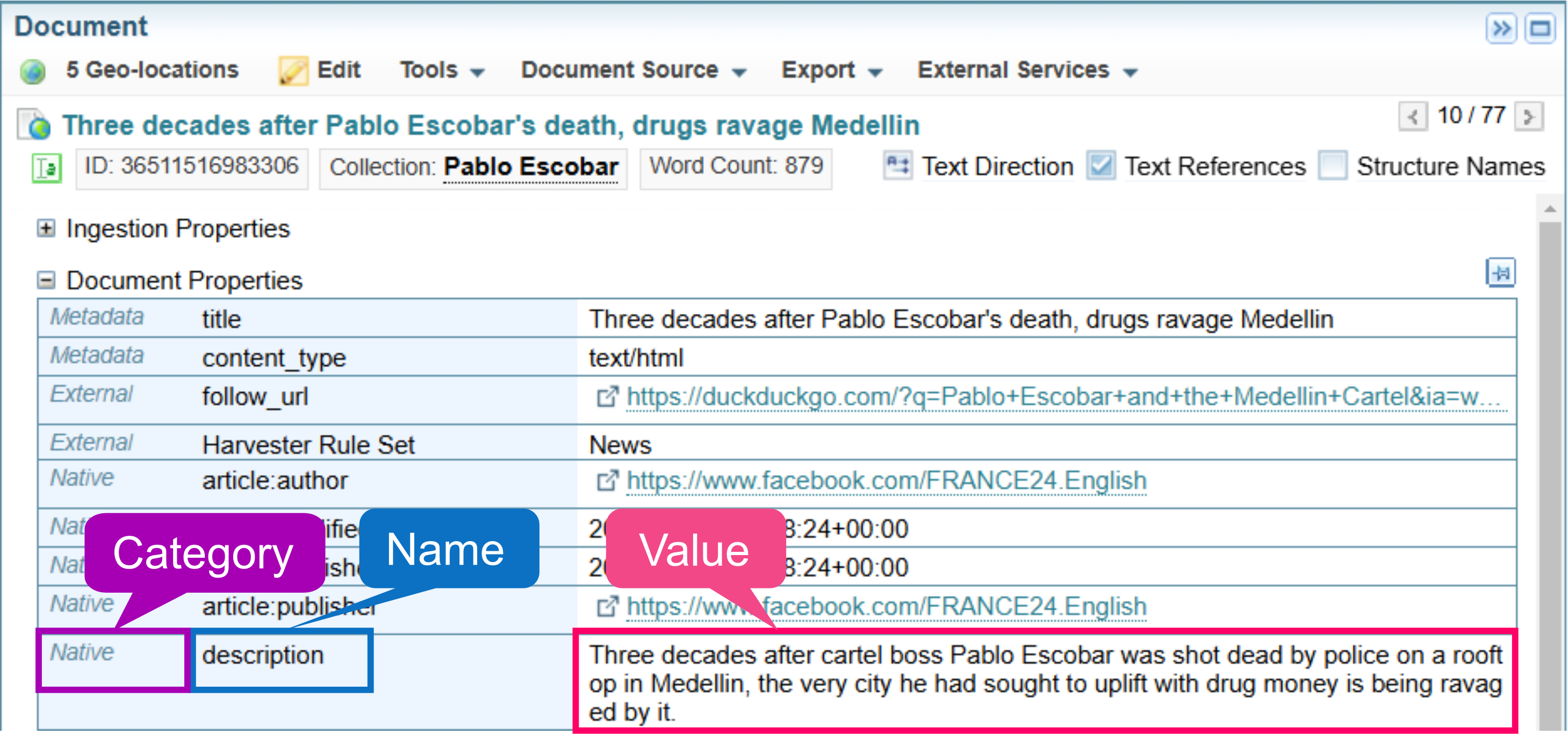
Documents
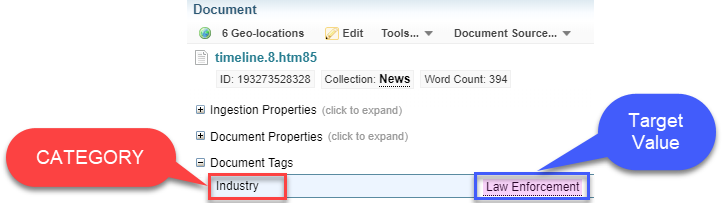
The Ingestion Properties, Document Properties and Document Tags sections are found at the top of the Document structure when viewing documents.
Text References are found in the last section, the Content section. The Content section is where the text content from the ingested source files is placed and is where the text analysis and entity extraction is run. See Documents.
Field path notation for information contained in Documents is summarised below:
Document Properties
Get the value of a document property.
|
Syntax |
:document.prop.<Category>.<Name>
|
|
|
Examples |
:document.prop.Native.description
|
|
Explanation
Document properties contain metadata and other information about an ingested document and can be found within a Sintelix Document in the Document Properties expanding section.
Ingestion Properties
Get the value of an ingestion property.
|
Syntax |
:document.ingestion.<Name>
|
|
|
Examples |
:document.ingestion.source_url
|
|
Document Tags
Get the value of document tags.
|
Syntax |
:document.tags.<Category>
|
|
|
Examples |
:document.tags.Industry
|
|
Text References in Documents
Get the value of an ingestion property.
|
Syntax |
ref.System.<Text Reference Tag>
|
|
|
Examples |
ref.System.Publication
|
|
Feature Values
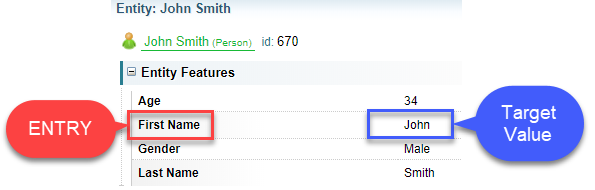
Entity Features can be identified when viewing:
-
a Document by selecting an Entity to display the Entity pane.
-
the Network Entity Node details. See Node Details: View, Edit & Report.
Features: String
Get the value of feature of the string data type.
|
Syntax |
features.<Name>
|
|
|
Examples |
features.First Name
|
|
Features: Datetime
Get the value of a feature of the datetime type.
|
Syntax |
date-timefeatures.<Name>
|
|
|
Examples |
datetime-features.DOB
|
|
Features: Geocoordinate
Get the value of feature of the geocoordinate type.
|
Syntax |
geocoordinate-features.<Name>
|
|
|
Examples |
geocoordinate-features.coordinates
|
|
Neighbour Values
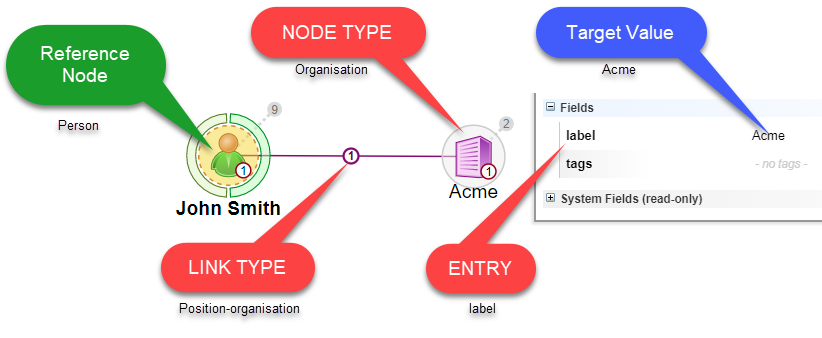
Neighbour values allows to get the values of neighbour nodes via connecting links. For example, you can collect the Feature values for a neighbouring node.
Features: String
Get the value of feature of the string data type.
|
Syntax |
features.<Name>
|
|
|
Examples |
features.First Name
|
|
Field path notation for Document Metadata begins with :document
|
Type |
Syntax | Examples |
|
|---|---|---|
|
Neighbour Values |
|
|
|
Neighbour field
|
:neighbours.<linkType>.<nodeType>.<Field Name>
:neighbours.Position-organisation.Organisation.label
Get the ids of Organisation nodes linked by job links. |
|
|
Neighbour features
|
:neighbours.<linkType>.<nodeType>.features.<Name>
:neighours.Location.Location.features.Actor
|
|
|
Neighbour by role
|
:linked.<selfRole>.<linkType>.<targetRole>.<neighbourType>
:linked.sender.Communication.recipient.*.label
Get labels of recipients via Communication links. :linked.*.Position-organisation.*.Organisation.id
Equivalent to :neighbours if no role conditions are specified. |
|
|
Cluster Values |
|
|
|
:cluster.context
|
:cluster.context:<Function>
:cluster.context:first(5)
Get the top 5 of the context terms used to cluster this node. |
|
|
:cluster.members
|
:cluster.members:<Function>
:cluster.members:count
Get the cluster member's count. |
|
|
Network Values |
|
|
|
Network ID
|
:network.id
network.id
Get the id of the Network. |
|
|
Network Name
|
:network.name
network.name
Get the name of the Network. |
|
|
Functions |
|
|
|
:count
|
<Expression>:count
tags:count
Count the number of tags in the "tags" field.
documentRefs:count
Count the number of references in the "documentRefs" field. |
|
|
:first
|
<Expression>:count
tags:first
Get the first tag from the "tags" field. |
|
|
:first(n)
|
<Expression>:first(n)
tags:first(3)
Get the first 3 tags from the "tags" field. |
|
|
:lower
|
<Expression>:lower
label:lower
Transform "label" to its lower case form. |
|
|
:upper
|
<Expression>:upper
tags:upper
Transform all tags from "tags" field to upper case. |
|
|
:tokens
|
<Expression>:tokens
texts:tokens
Transform "texts" to a combined list of tokens. |
|
|
:unique
|
<Expression>:unique
texts:tokens:unique
Get a unique set of tokens from "texts". |
|
|
:significant
|
<Expression>:significant
texts:tokens:significant
Filter and get a list of significant tokens from "texts" to use as context. |
|
|
:significant(wordRarity)
|
<Expression>:significant(wordRarity)
texts:tokens:significant(0.05)
Filter and get a list of significant and rare tokens from "texts" to use as context. |
|
|
:format(template)
|
<Expression>:format(template)
:document.id:format(http://localhost:8081/document/<>)
Construct a document URL. |
|
|
:regex(pattern)
|
<Expression>:regex(pattern)
feature.emailAddress:regex(@<.+>$)
Get the domain name of an email address. |
|
|
:context
|
<Expression>:context
weightedContext:context
Decode the stored "weightedContext" to a list of tokens. |
|
|
Additional Syntax |
|
|
|
First Available |
<Expression> | <Expression>
features.nickName | features.firstName
Use nick name if available otherwise use first name as an alternative. |
|
|
Literal |
"<text>"
"unknown"
Set the value to "unknown".
features.gender | "unknown"
Use the value "unknown" when gender feature is unavailable. |
|
|
Wildcard |
<Expression>.*.<Expression>
:neighbours.Colocation.*.id:count
Count the number of colocated neighbours. |
|
|
Type |
Section |
Identifier |
|---|---|---|
|
|
features |
[Field Name] |
|
|
datetime-features |
[Field Name] |
|
|
geocoordinate-features |
[Field Name] |
|
:neighbours |
[Link Type].[Node Type] |
[Field Name] |
Entity Features: Geocoordinate
Used to reference an entity features of the geocoordinate data type.
Syntax:
geocoordinate-features.[FIELD NAME]Example:
geocoordinate-features.coordinates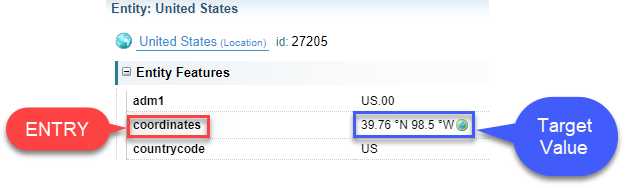
For geocoordinates values to display in Maps they need to have a field name called coordinates.
Geocoordinate fields are identifiable by the globe icon next to the field.
Functions
There are functions that you can use with the notations described above.
|
Type |
Syntax | Examples |
|
|---|---|---|
|
Field Value |
|
|
|
Field
Get the value of the target field. |
<Field Name>
label
tags
|
|
|
Document Values |
|
|
|
Document Properties
Get the value of a document property. |
:document.prop.<Category>.<Name>
:document.prop.Metadata.content_type
|
|
|
Ingestion Properties
Get the value of an ingestion property. |
:document.ingestion.<Name>
:document.ingestion.source_url
|
|
|
Document Tags
Get the values of document tags. |
:document.tags.<Category>
:document.tags.Industry
|
|
|
Text References in Documents
Get the value of Text Reference in a document. |
ref.System.<Text Reference Tag>
ref.System.Publication
|
|
| Feature Values | ||
|
Features: String
Get the value of feature of the string data type. |
features.<Name>
features.First Name
|
|
|
Features: Datetime
Get the value of a feature of the datetime type. |
date-timefeatures.<Name>
datetime-features.DOB
|
|
|
Features:Geocoordinate
Get the value of feature of the geocoordinate type. |
geocoordinate-features.<Name>
geocoordinate-features.coordinates
|
|
|
Neighbour Values |
|
|
|
Neighbour field
|
:neighbours.<linkType>.<nodeType>.<Field Name>
:neighbours.Position-organisation.Organisation.label
Get the ids of Organisation nodes linked by job links. |
|
|
Neighbour features
|
:neighbours.<linkType>.<nodeType>.features.<Name>
:neighours.Location.Location.features.Actor
|
|
|
Neighbour by role
|
:linked.<selfRole>.<linkType>.<targetRole>.<neighbourType>
:linked.sender.Communication.recipient.*.label
Get labels of recipients via Communication links. :linked.*.Position-organisation.*.Organisation.id
Equivalent to :neighbours if no role conditions are specified. |
|
|
Cluster Values |
|
|
|
:cluster.context
|
:cluster.context:<Function>
:cluster.context:first(5)
Get the top 5 of the context terms used to cluster this node. |
|
|
:cluster.members
|
:cluster.members:<Function>
:cluster.members:count
Get the cluster member's count. |
|
|
Network Values |
|
|
|
Network ID
|
:network.id
network.id
Get the id of the Network. |
|
|
Network Name
|
:network.name
network.name
Get the name of the Network. |
|
|
Functions |
|
|
|
:count
|
<Expression>:count
tags:count
Count the number of tags in the "tags" field.
documentRefs:count
Count the number of references in the "documentRefs" field. |
|
|
:first
|
<Expression>:count
tags:first
Get the first tag from the "tags" field. |
|
|
:first(n)
|
<Expression>:first(n)
tags:first(3)
Get the first 3 tags from the "tags" field. |
|
|
:lower
|
<Expression>:lower
label:lower
Transform "label" to its lower case form. |
|
|
:upper
|
<Expression>:upper
tags:upper
Transform all tags from "tags" field to upper case. |
|
|
:tokens
|
<Expression>:tokens
texts:tokens
Transform "texts" to a combined list of tokens. |
|
|
:unique
|
<Expression>:unique
texts:tokens:unique
Get a unique set of tokens from "texts". |
|
|
:significant
|
<Expression>:significant
texts:tokens:significant
Filter and get a list of significant tokens from "texts" to use as context. |
|
|
:significant(wordRarity)
|
<Expression>:significant(wordRarity)
texts:tokens:significant(0.05)
Filter and get a list of significant and rare tokens from "texts" to use as context. |
|
|
:format(template)
|
<Expression>:format(template)
:document.id:format(http://localhost:8081/document/<>)
Construct a document URL. |
|
|
:regex(pattern)
|
<Expression>:regex(pattern)
feature.emailAddress:regex(@<.+>$)
Get the domain name of an email address. |
|
|
:context
|
<Expression>:context
weightedContext:context
Decode the stored "weightedContext" to a list of tokens. |
|
|
Additional Syntax |
|
|
|
First Available |
<Expression> | <Expression>
features.nickName | features.firstName
Use nick name if available otherwise use first name as an alternative. |
|
|
Literal |
"<text>"
"unknown"
Set the value to "unknown".
features.gender | "unknown"
Use the value "unknown" when gender feature is unavailable. |
|
|
Wildcard |
<Expression>.*.<Expression>
:neighbours.Colocation.*.id:count
Count the number of colocated neighbours. |
|
Mathematical functions
You can use the * wildcard within the field value notations.
Example:
In this example, the wildcard is used in place of the Node Type, therefore all node types linked with a Presence Link Type to the node/document will be included.
:neighbours.Presence.*.labelMathematical functions
|
Function |
Description |
Example |
|
|---|---|---|---|
| :sum | Calculates the total sum of all values in the field. | ||
| :avg | Calculates the average (mean) of all values in the field. | ||
| :min | Returns the smallest value in the field. | ||
| :max | Returns the largest value in the field. | ||
| :median | Finds the middle value when the values are sorted. | ||
| :count | Returns the number of values in the field. |
Text Functions
|
Function |
Description |
|---|---|
| .text:significant |
Identifies terms (words and phrases) that are statistically significant within the matching documents or entities. Performs significant terms analysis to identify terms that are unusually frequent in a foreground set (the matching documents or nodes) compared to a background set (usually the entire collection). This helps you discover terms that are characteristic or distinctive. |
| .text:tokens:significant |
Identifies words that are statistically significant within the matching documents or entities. This breaks down the text field into individual tokens (usually words). Then, the significant terms analysis (described above) is performed on these individual tokens. |
| :unique |
Filters out duplicate values. Useful when collecting the values for tags. For example: :document.tags.Country Code:unique |
| :first | Returns the first value. |
| :last | Returns the last value. |
|
:array_contains |
|
Examples
Below is an example of Field Path Notation used for a node in the Network Creation configuration.
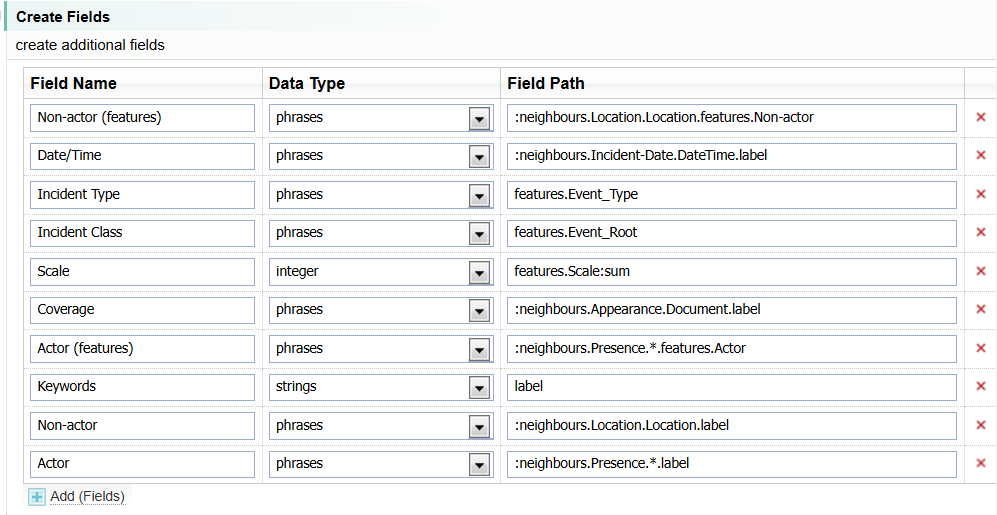
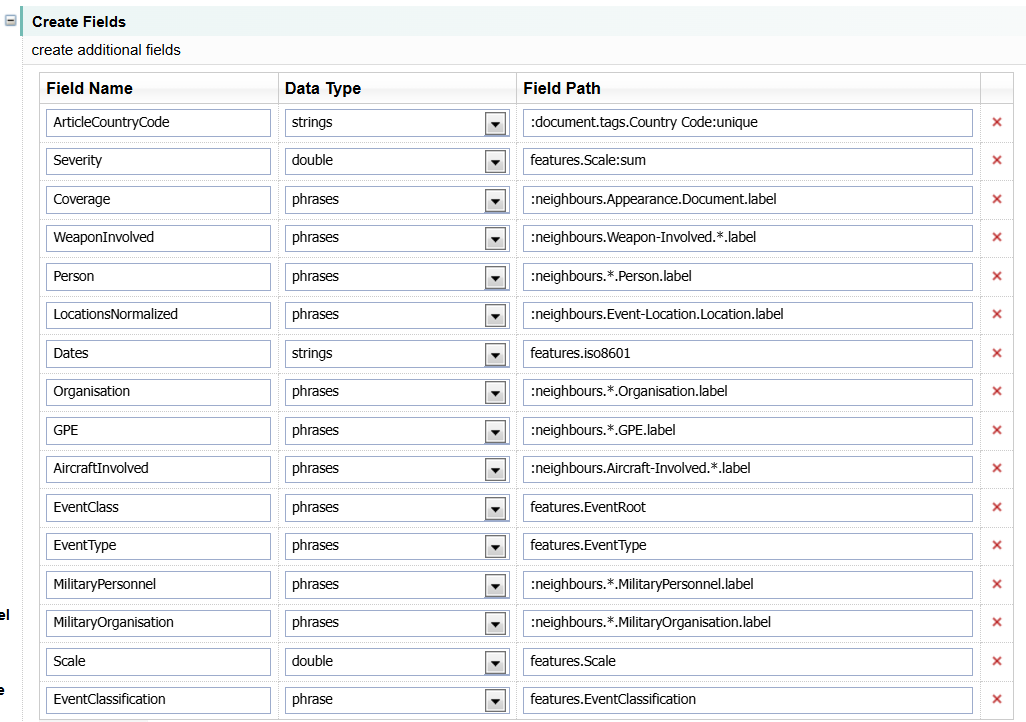
The image below shows the results in the event node fields for one event node.