Security Groups
Introduction
Access to Projects, Collections and Networks can be assigned to individual users or to groups.
Check Security Groups
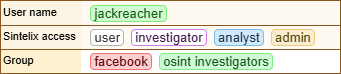
You can see what security groups you belong to by checking your Account Overview. See My Account.
Create a Security Group
Security groups are free text. You can create a new security group simply by typing a new security group name into the security group field.
Assign a User to a Security Group
For users created and managed within Sintelix, an Administrator can assign users to a security group.
For users created and managed external to Sintelix, group membership will depend on the capabilities of the external user authentication. However, an Administrator can override these settings and assign users to security groups within Sintelix.
Add a Security Group
To add a new security group:
-
Select the
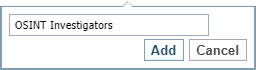
 Add button to display the add users and/or groups.
Result: The Add dialog is displayed.
-
Enter security group name
-
Select the Add button.
Remove a Security Group
To remove a security group select the  icon beside group name.
