Columns
Using columns allows you to apply unique attributes to each individual entry.
Syntax
Set Columns:
#cols col-definition, <col-definition>, <col-definition>
Clear Columns:
#clear cols
One of the columns must be text, representing the dictionary entry.
Column definition
The column definition can include the following functions:
-
feature:<label>:<type>
-
generalise:plural
-
generalise:reduce
-
cond:case
-
cond:context
Comma Separated Entries
Each entry must have commas separating the columns that have been defined, even if the value is empty.
For example, if two columns are defined, each entry must have at least one comma.
#cols text, feature:abbrev,
Business to Business, B2B
If an entry is missing a comma, a syntax error message will be displayed.
#cols text, feature:abbrev,
Business to Business

If commas occur within the column values, the column value should be contained in double quotes.
For example, "Receivable, Accounts"
Example: Multiple Columns
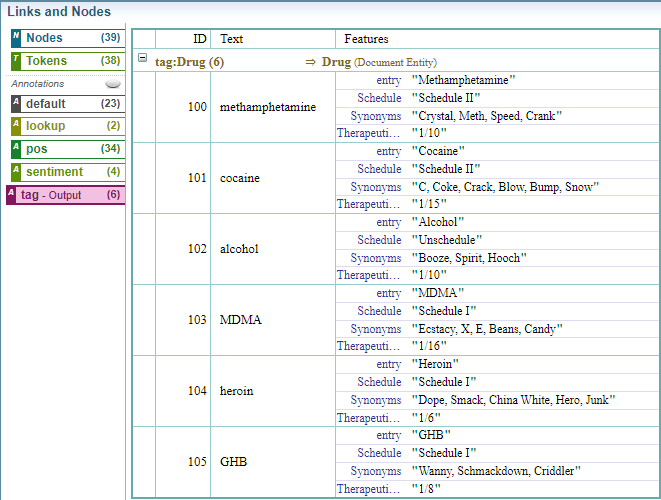
This example shows a column definition with four columns: text - for the dictionary entry and three features "Schedule" and "Therapeutic Ratio" and "Synonyms".
#wordlist tag:Drugs

#cols text, feature:Schedule, feature:"Therapeutic Ratio", feature:Synonyms
Methamphetamine, Schedule II, 1/10, "Crystal, Meth, Speed, Crank"
Cocaine, Schedule II, 1/15, "C, Coke, Crack, Blow, Bump, Snow"
Alcohol, Unschedule, 1/10, "Booze, Spirit, Hooch"
MDMA, Schedule I, 1/16, "Ecstacy, Molly, Pingers, Flippers, X, E, Beans, Candy"
Heroin, Schedule I, 1/6, "Dope, Smack, China White, Hero, Junk"
GHB, Schedule I, 1/8, "Wanny, Schmackdown, Criddler"


/*
#EXAMPLE
It’s important to be aware of the dangers of substance abuse, as mixing methamphetamine, cocaine, alcohol, MDMA, heroin, and GHB can have severe and potentially life-threatening consequences.
#EXAMPLE END
*/
Result:
It’s important to be aware of the dangers of substance abuse, as mixing methamphetamine, cocaine, alcohol, MDMA, heroin, and GHB can have severe and potentially life-threatening consequences.
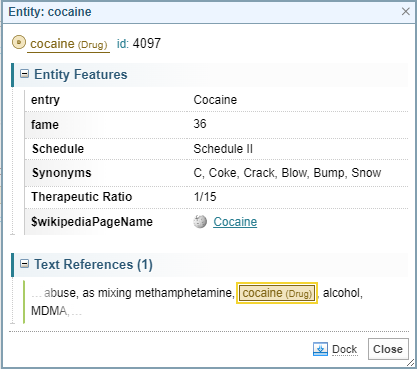
When you select the Cocaine entity, the entity features are displayed.
Example: Clearing Columns
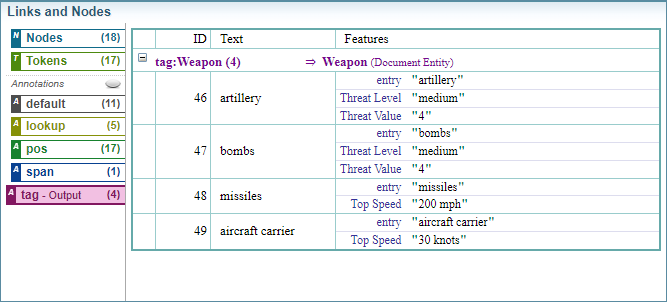
This example shows a column definition with three columns: text - for the dictionary entry and two features "Threat Level"and "Threat Value".
The column definitions is cleared and a new column definition is defined with the feature "Top Speed".
#wordlist tag:Weapon

#cols text, feature:"Threat Level", feature:"Threat Value"
artillery, medium, 4
bombs, medium, 4

#clear cols //clear the previous column structure

#cols text, feature:"Top Speed"
missiles, 200 mph
aircraft carrier, 30 knots
/*
#EXAMPLE
During the attack, artillery, bombs and missiles were used to disable the aircraft carrier.
#EXAMPLE END
*/
Result:
During the attack, artillery, bombs and missiles were used to disable the aircraft carrier.
Column Order
Column definitions can be defined in any order.
One of the column definitions must be text as a place holder for the dictionary entry.
For example, below are two examples of column definitions where the order is varied.
#cols text, feature:abbrev
Business to Business, B2B
#cols feature:abbrev, text
CEO, Chief Executive Officer
Default values
You can set a default value for a column by setting the relevant attribute. The default value is added to an entry if a column is left empty.
For example, below is an example where the feature "abbrev" default value is set to NONE. In this example, the entry Benchmark will have the default value NONE applied to the feature "abbrev"
#cols text, feature:abbrev
#feature:abbrev NONE
Business to Business, B2B
Benchmark,
Empty values
If a entry column is left empty and no default is set, then the attribute will not be applied.
For example, if the column is defining:
-
a feature, then no feature is applied to the entity.
-
plurals, then the default of no plurals is applied.
-
context, then no context is applied.
-
case, then the default of all case is applied.
-
reduce, then the default of no reduce is applied.
Example: Column Order and Default Values
This example shows how the columns order can be varied. Setting a new column configuration clears the previous column definition.
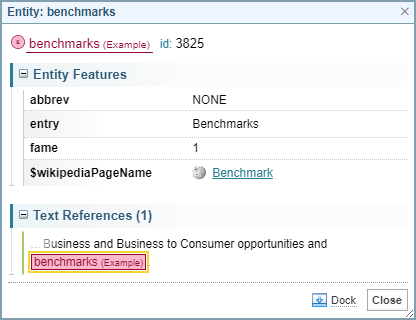
This example also shows how you can set a default value for the columns. In this example, the feature "abbrev" has a default set to NONE. The entries benchmark and Headquarters do not provide a value for the abbreviation, so the default value of NONE is applied.
#wordlist tag:Example
#generalize:plural true

// define a two columns: text and a string feature "abbrev"
#cols text, feature:abbrev

// set the default value for the feature "abbrev"
#feature:abbrev NONE

Business as Usual, BAU
Business to Business, B2B
Business to Consumer, B2C
Benchmark,

// new cols definition clears the previous column layout
// you can customise the order setting
// now the second column is the entry text

#cols feature:abbrev, text
CEO, Chief Executive Officer
CRM, Customer Relationship Management
CFO, Chief fiNaNcial Officer
COO, Chief Operating Officer
,Headquarters


/*
#EXAMPLE
The Chief Executive officer is meeting with the Chief FiNaNcial Officer at Headquarters to discuss Business to Business and Business to Consumer opportunities and benchmarks.
#EXAMPLE END
*/
Result:
The Chief Executive officer is meeting with the Chief FiNaNcial Officer at Headquarters to discuss Business to Business and Business to Consumer opportunities and benchmarks.
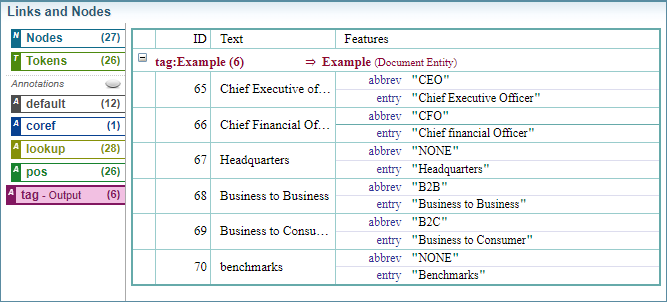
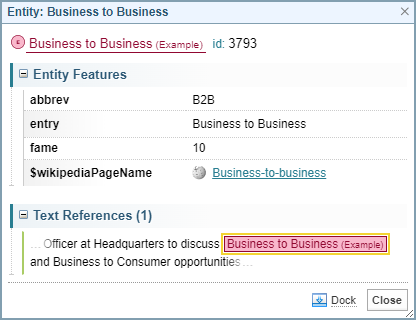
When you select the benchmarks entity, the following details are shown. In this example, the default abbrev NONE has been applied.
Example: Multiple Definitions and Default Values
This example shows how you can apply the different functions in column definitions, combining, feature, conditional context and plurals.
#wordlist tag:Example
// define 4 columns:
// 1: text is the dictionary entry
// 2: string feature names "abbrev"
// 3: conditional context
// 4: plurals
#cols text, feature:abbrev, cond:context, generalize:plural
// set the default value for the feature "abbrev"
#feature:abbrev NONE
// set the default value for plurals
#generalize:plural true
// set the default context
#cond:context business
Business as Usual, BAU, opportunities, false
Business to Business, B2B, meeting, false
Business to Consumer, B2C, , false
// empty columns apply the default values set earlier
Benchmark, , ,

// new cols definition clears the previous column layout
#cols feature:abbrev, text
// you can customise the order setting
// now the second column is the entry text
CEO, Chief Executive Officer
CRM, Customer Relationship Management
CFO, Chief fiNaNcial Officer
COO, Chief Operating Officer
, Headquarters

/*
#EXAMPLE
The Chief Executive officer is meeting with the Chief FiNaNcial Officer at Headquarters to discuss Business to Business and Business to Consumer opportunities and benchmarks.
#EXAMPLE END
*/
Result:
The Chief Executive officer is meeting with the Chief FiNaNcial Officer at Headquarters to discuss Business to Business and Business to Consumer opportunities.
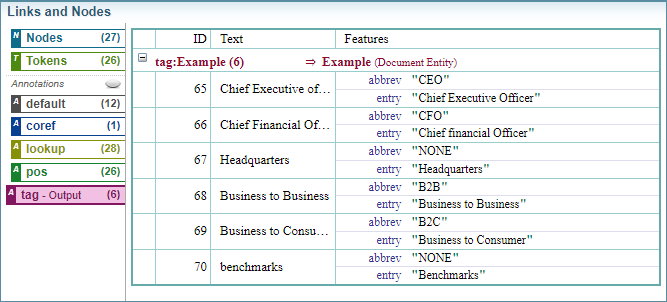
Below shows the entity display for the Business to Business text reference.