Perform Sentiment Analysis
Sentiment analysis identifies positive or negative sentiments that are expressed within text.
For example, a business owner may want to analyse public sentiment toward their brand, or a police investigator may want to identify opinions expressed publicly by persons of interest in a criminal investigation.
Where possible, sentiment analysis can identify cases where sentiments are expressed towards a specific entity, and by a specific entity. This enables you to answer the question ‘Who expressed what sentiment about what?’ The sentiment analysis capability creates links between the sentiment phrase that was used and the entity toward which it was expressed. A link is also created between the entity that expressed the sentiment and the entity towards which it was expressed.
To perform a sentiment analysis on a collection you need to:
- enable the Sentiment Analysis capability in the Document Processing configuration
- if necessary, Create a dictionary of custom sentiment terms and add it to the Dictionaries (Early Stage) section of the Document Processing configuration.
- ingest the documents you want to analyse or reprocess documents that have already been ingested
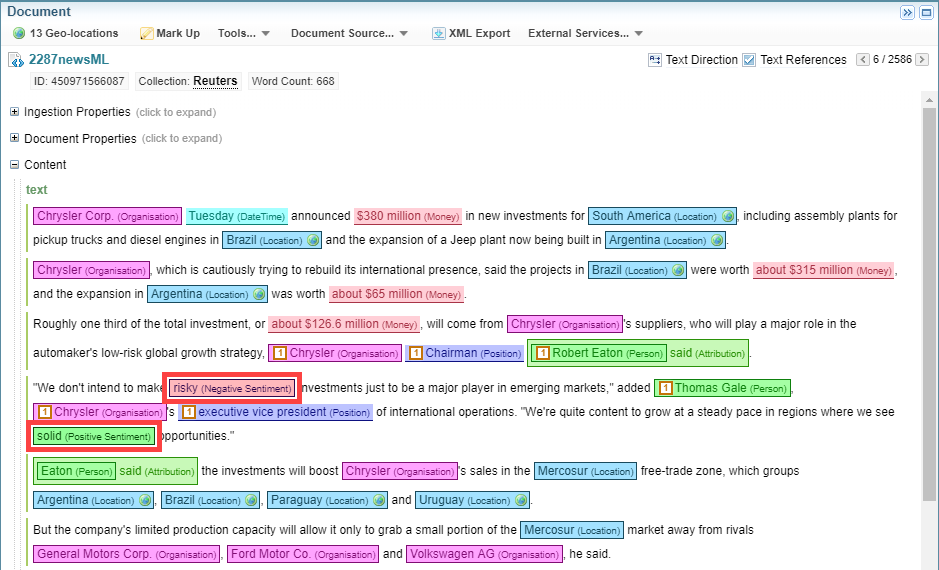
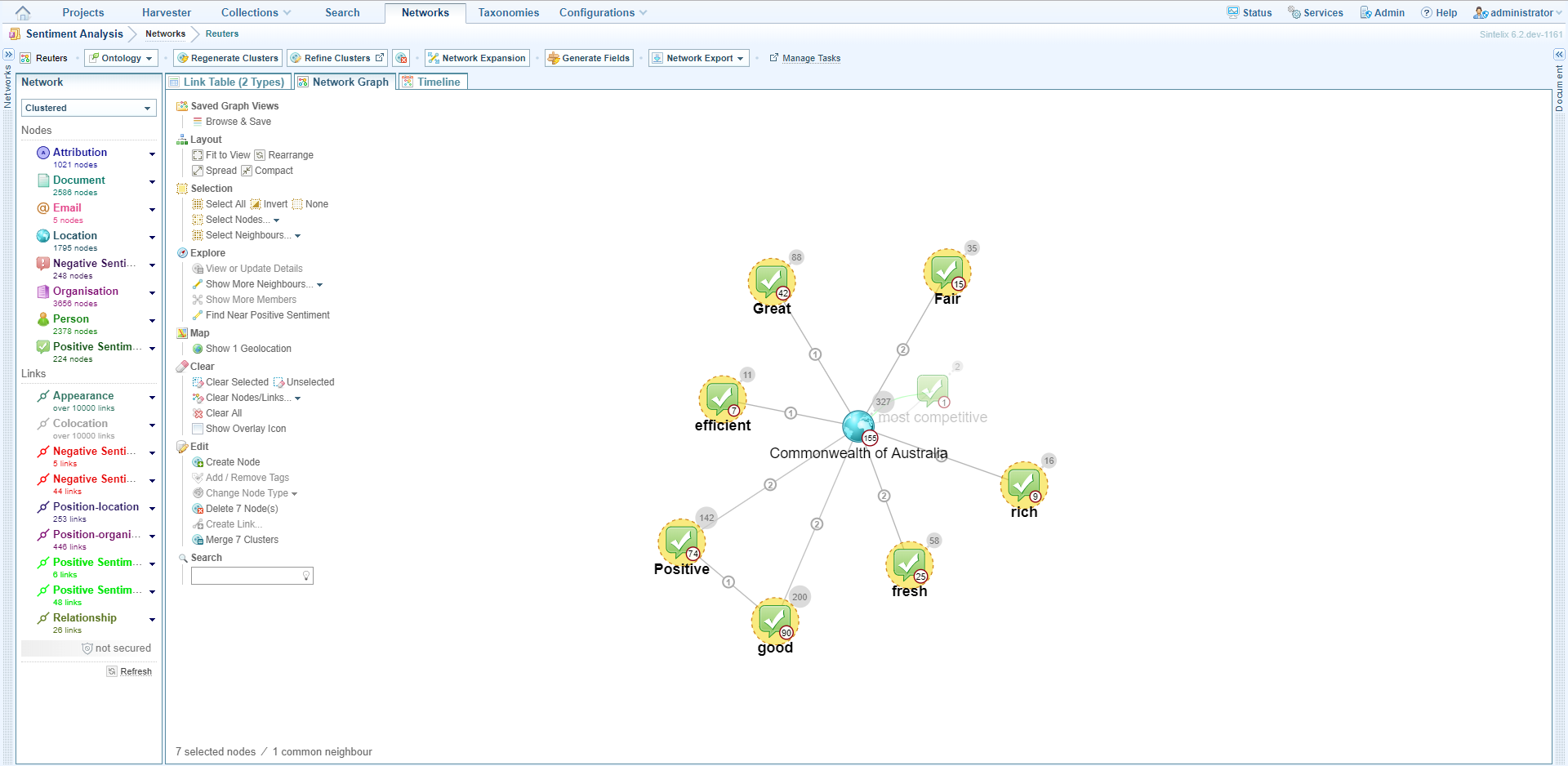
When the documents have been ingested or reprocessed, the positive and negative sentiments are marked up in the documents. You can view them by clicking on individual documents and by creating a network.
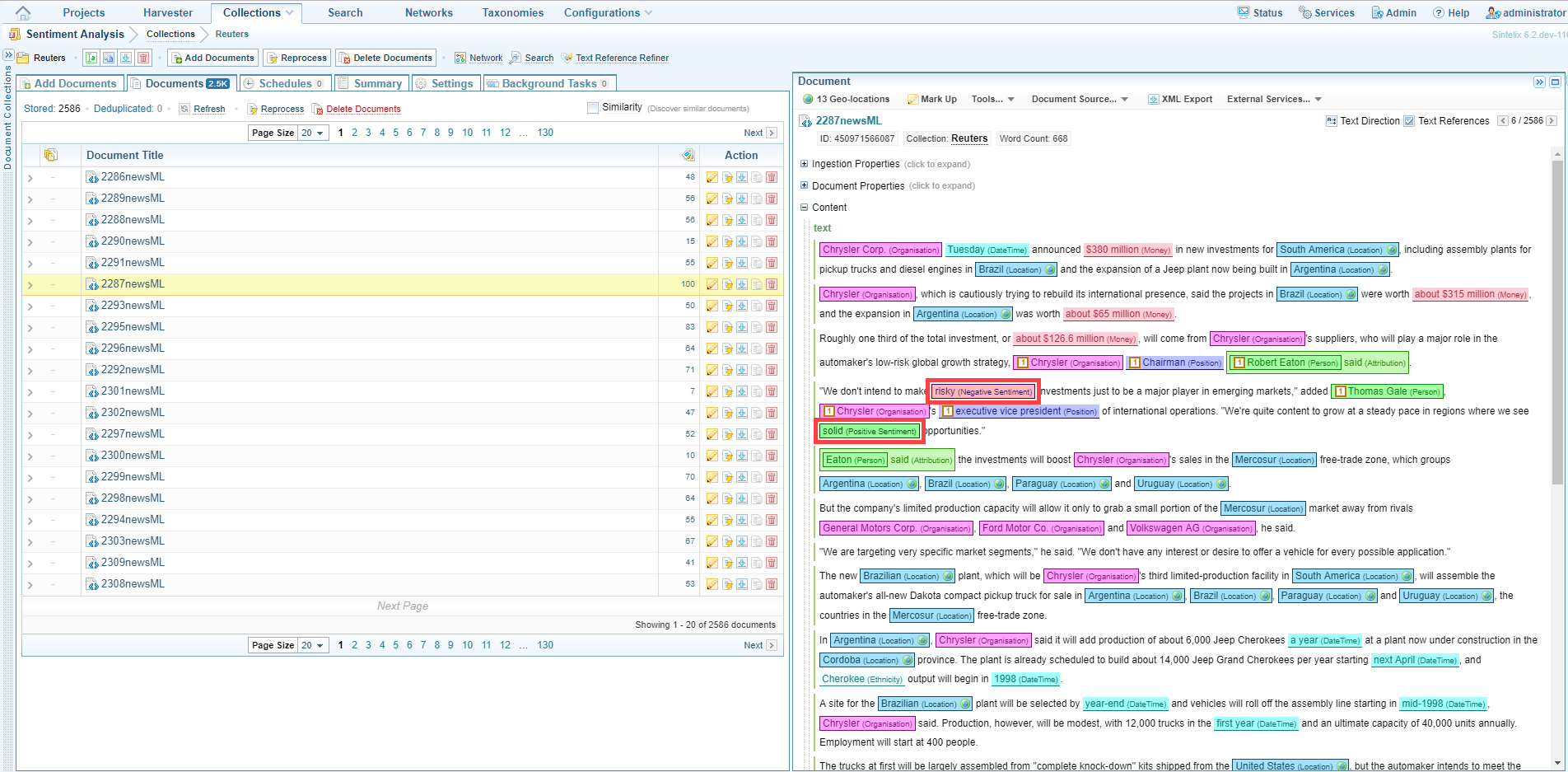
Create a dictionary of custom sentiment terms
If you want to identify specific sentiments in a collection you can create a dictionary for this purpose and add the terms to it. Depending on the type of sentiment analysis being conducted, you may focus on different words.
The sentiment analysis capability will apply concepts such as negation to all custom words, so aim to use the shortest, relevant word or term.
For example, if you want to capture the sentiment ‘not long-lasting’ in a sentence such as ‘The batteries were not very long-lasting’, add the word ‘long-lasting’ to the positive sentiment phrases section of the dictionary. The sentiment analysis capability will automatically process the negation ‘not’ and accurately tag the phrase ‘not very long-lasting’ as a negative sentiment. The capability will also check for other negations such as ‘isn’t’, ‘don’t’ and ‘wouldn’t’.
If you were to add the phrase ‘not long-lasting’ to the negative phrases section of the dictionary, the capability would only detect it when it appeared in that exact form. The phrase ‘not very long-lasting’ would therefore be missed.
By adding only the relevant word or term to the positive dictionary, the term will be tagged correctly when it is used in both positive sentiments (even where phrases begin with intensifiers like ‘very’ and ’extremely’), and negative sentiments.
To create a dictionary of custom sentiment terms, create a new dictionary with a name that reflects its purpose. For information about dictionaries see Dictionaries.
-
Create a new dictionary with a name that reflects its purpose. For information about dictionaries see Dictionaries.
 Example
Below is an example of a sentiment Dictionary.
Copy#wordlist positive-sentiment
// Learnt through existing lists
abundant
accessible
accurate
adaptable
adequate
admirable
adventurous
affordable
agile
amazing
ample
appealing
appreciative
appropriate
astonishing
attentive
attractive
authentic
avid
awesome
balanced
beautiful
benevolent
best
breathtaking
bright
brilliant
capable
captivating
catchy
chic
classic
clean
//clear
coherent
colorful
comfortable
compact
compatible
competitive
complimentary
comprehensive
confident
consistent
convenient
correct
courageous
courteous
cozy
creative
crisp
dazzling
decisive
delicate
delicious
delightful
dependable
deserving
desirable
diligent
distinctive
durable
eager
easy
economical
effective
efficient
effortless
elegant
energetic
engaging
enjoyable
enthusiastic
enviable
equitable
eventful
evocative
excellent
exceptional
exciting
expansive
exquisite
extraordinary
fair
famous
fantastic
fascinating
favorable
favorite
festive
fiery
flawless
flexible
fond
foolproof
foremost
fortunate
//free
fresh
friendly
fruitful
gifted
good
graceful
//grand
great
greatest
handy
happy
hardy
healthy
heartfelt
helpful
heroic
hospitable
//hot
ideal
idyllic
imaginative
immaculate
impeccable
important
impressive
incredible
inexpensive
influential
ingenious
innovative
insightful
instrumental
intelligent
interesting
intricate
intriguing
intuitive
inventive
jolly
joyous
knowledgeable
legendary
lively
logical
lovely
lucid
lush
luxurious
manageable
marvelous
meaningful
memorable
modern
monumental
neat
nice
noteworthy
outstanding
patient
perfect
phenomenal
plentiful
poigNaNt
popular
portable
positive
powerful
precise
preferable
prestigious
priceless
proficient
progressive
prolific
promising
//prompt
proper
proud
//ready
realistic
reasonable
receptive
refined
refreshing
regal
reliable
remarkable
reputable
resourceful
responsive
rewarding
rich
//right
safe
satisfactory
scenic
seamless
secure
sensitive
skilled
sleek
smart
smooth
solid
sophisticated
spacious
spectacular
splendid
stainless
stellar
streamlined
sturdy
stylish
successful
suitable
sumptuous
super
superb
superior
supportive
talented
terrific
thankful
thorough
thoughtful
//top
tranquil
truthful
understandable
unforgettable
unlimited
unparalleled
unrestricted
upbeat
usable
useful
valuable
versatile
//warm
welcome
wholesome
wonderful
workable
//worth
worthwhile
// Manually Added
viable
superior
functional
awsome
love
loves
loved
lovely
advantage
advantages
enjoy
enjoys
enjoying
enjoyed
enjoyable
enjoyably
success
successfully
impressed
tremendous
tremendously
amaze
amazed
topnotch
top notch
top-notch
better
sexy
sexier
sexiest
attractive
trusted
warm welcome
proactive
pro active
pro-active
informative
#wordlist negative-sentiment
// Learnt from existing lists
absurd
abusive
//accidental
adverse
afraid
agonizing
ambivalent
anemic
angry
annoying
anxious
//apocalyptic
appalling
apprehensive
arrogant
ashamed
atrocious
awkward
bad
bizarre
blatant
blinding
bloated
//bloody
blunt
boring
brash
brazen
brittle
brutal
catastrophic
caustic
chaotic
childish
chilly
chronic
clumsy
cocky
comical
compulsive
confusing
controversial
convoluted
corrupt
cranky
crass
crazy
crooked
cruel
cynical
damaging
//damn
dangerous
//dark
//dead
//deadly
debatable
debilitating
decadent
defensive
defiant
deluded
delusional
deplorable
depressed
derogatory
desolate
desperate
desultory
detestable
diabolical
dilapidated
dirty
disconcerting
discouraging
disgusting
disobedient
dissatisfied
disturbing
dogged
dreadful
dreary
drunk
drunken
dubious
dull
dumb
eccentric
egregious
envious
evasive
evil
excessive
faint
fake
false
fanciful
fatal
//fearsome
fictional
fictitious
fierce
filthy
flimsy
foolish
forceful
foul
frigid
frustrated
fugitive
fussy
futile
fuzzy
gaudy
ghastly
gloomy
greedy
grim
grisly
gritty
gross
grotesque
gruff
guilty
haphazard
harsh
hateful
haunting
heedless
hefty
hesitant
hideous
hopeless
horrendous
horrible
horrid
horrific
horrifying
hostile
hypocritical
hysterical
idiotic
idle
ignorant
illegal
illegitimate
illogical
impatient
imperfect
implausible
//impossible
impotent
imprecise
impulsive
inadequate
iNaNe
inappropriate
inattentive
incapable
incendiary
incompatible
incompetent
incorrect
indifferent
inept
inescapable
inevitable
inexcusable
inexperienced
infamous
inflexible
inopportune
insane
insecure
insignificant
insufficient
insulting
invective
invisible
ironic
irrelevant
irritating
jaded
jealous
jittery
lackadaisical
lame
laughable
lazy
lethal
lifeless
loathsome
lone
lonely
lousy
lowly
ludicrous
//mad
maddening
maladjusted
malicious
marginal
meaningless
mediocre
melodramatic
messy
mischievous
miserable
misguided
monotonous
morbid
mournful
murderous
mysterious
naive
nasty
naughty
needless
negative
negligent
nervous
neurotic
nonexistent
notorious
numb
obscene
odd
offensive
outrageous
//overwhelming
overzealous
painful
pale
paranoid
pathetic
peculiar
perplexed
perverse
picky
pitiful
pointless
poor
pretentious
primitive
problematic
profane
prohibitive
puzzling
//queer
questionable
radical
ragged
rampant
regretful
reluctant
remorseless
repulsive
restless
revengeful
ridiculous
rigid
risky
//rival
rough
rude
rusty
sad
savage
scarce
scary
//secretive
seedy
selfish
senseless
shabby
shallow
shameful
shameless
shocking
shoddy
shrill
//sick
sickening
sickly
silly
simplistic
sinful
sinister
skeptical
sketchy
slack
sloppy
slow
sluggish
sly
//somber
sore
//sorry
sour
spotty
stagNaNt
stale
stark
startling
static
steep
stereotypical
sticky
stiff
stormy
strange
stubborn
stuffy
stupid
subversive
superficial
suspicious
tedious
tense
terrible
thankless
tiresome
tortured
touchy
tragic
tricky
trivial
troublesome
turbulent
ugly
unacceptable
unattractive
unbelievable
uncertain
unclean
unclear
uncomfortable
unconvincing
underpaid
uneasy
unethical
unexplained
unfavorable
unfinished
unfortunate
unfriendly
unhappy
unhealthy
unjust
unnerving
unpleasant
unprepared
unrealistic
unreasonable
unrelenting
unstable
unsteady
unsuspecting
untimely
unwanted
unwarranted
unwelcome
unwilling
unworthy
useless
vague
vengeful
venomous
vicious
violent
vulgar
wary
weak
weary
weird
wicked
//wild
worthless
wretched
wrong
wrongful
// Manually Added
hurt
hurts
hurting
concern
concerns
concerned
concerning
con
cons
flaw
flaws
flawed
problem
problems
liar
lied
lying
cheat
cheated
cheater
cheating
worst
worsen
worsened
//issue
//issues
distort
distorts
distorted
inconvenient
inconvenience
inconveniences
inconvenienced
obscures
obscured
drawback
draw back
draw-back
drawbacks
draw backs
draw-backs
disappoint
dissappoint
disapointments
dissapointments
disappointing
dissappointing
disappointingly
dissappointingly
disappointment
dissappointment
disappointed
dissappointed
torture
torturous
misfortune
unfortunate
inferior
cumbersome
thumbs down
thumbs-down
awful
aweful
gripe
inoperable
dull
lack
lacks
lacking
criticsm
complaint
complaints
despicable
suck
sucks
sucked
disdain
unfortunately
unfortunate
stink
stinks
stunk
slimy
sleezy
sleazy
bulky
fragile
monstrous
monstrosity
pain
pains
painful
painfully
infuriate
infuriates
infuriated
infuriating
confuse
confuses
confused
confusion
confusing
crap
crappy
crapped
shit
shits
shitty
shitter
shittiest
shithouse
fuck over
fucked over
fucking over
fuck up
fucked up
fucking up
junk
trash
trashy
garbage
lag
laggy
lagged
frustration
frustrating
aggrivate
aggravate
aggrivation
aggravation
aggrivating
aggravating
cheasy
cheesy
substandard
sub-standard
sub-par
sub par
fail
fails
failed
failing
ruin
ruined
ruining
//break
//broke
//breaks
//broken
//breaking
unresponsive
nonresponsive
non-responsive
unresponsiveness
defective
error
errors
crummy
idiot
idiocy
moron
moronic
amoral
unconscionable
racist
sexist
bigoted
bigot
homophobic
xenophobic
belligerent
onerous
ornery
quarrelsome
antagonistic
hostile
bitter
hate
hates
hated -
Open the document processing configuration you will use for sentiment analysis and add the dictionary to the Dictionaries (Early Stage) section.
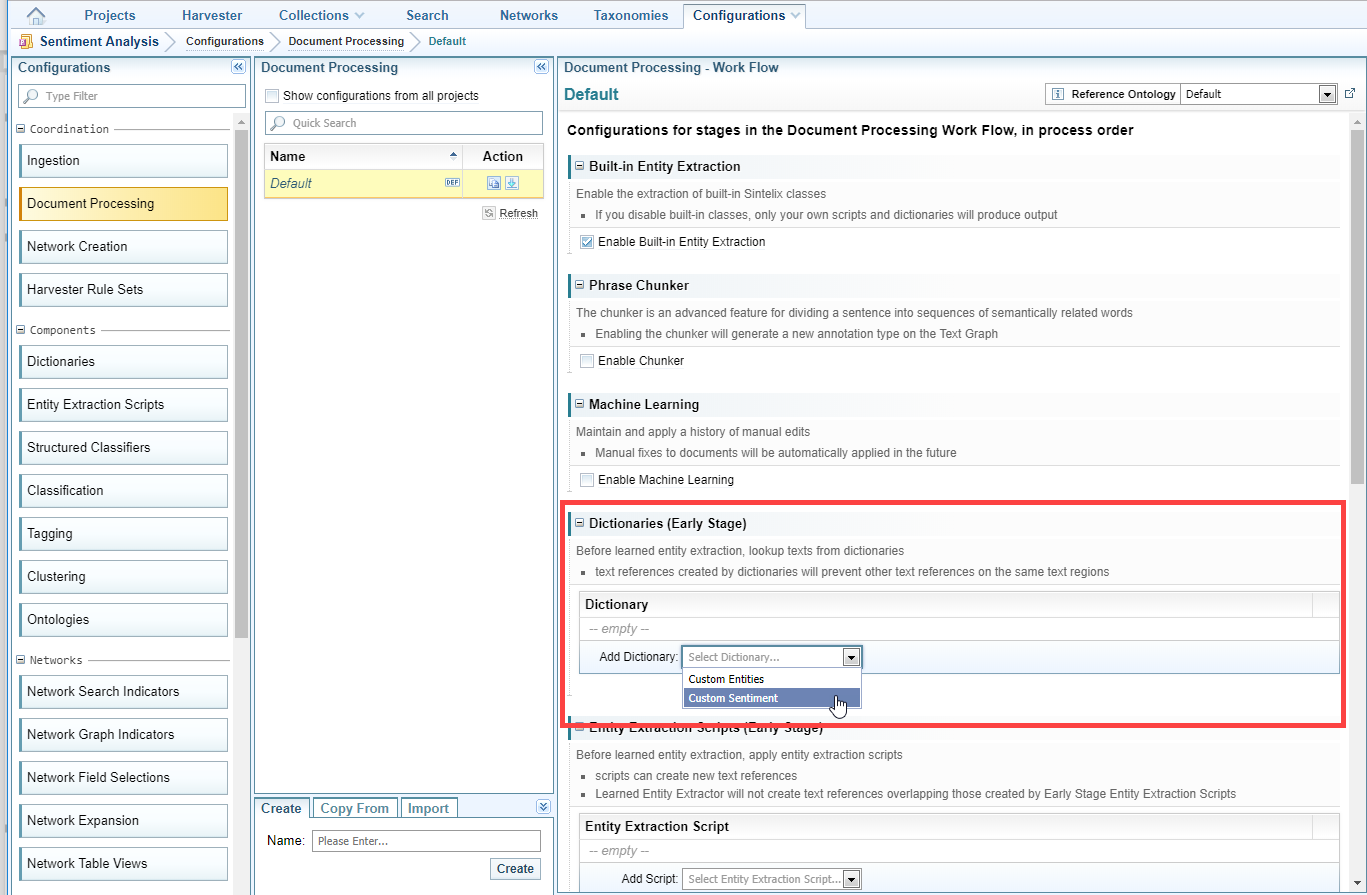
Perform a sentiment analysis
To perform a sentiment analysis:
- Open the project that contains the collection in which you want to analyse sentiment.
- Make sure that you have created a document processing configuration where sentiment analysis has been enabled, and that you have specified the ontology classes to which sentiments can be linked and/or attributed (see Ontology).
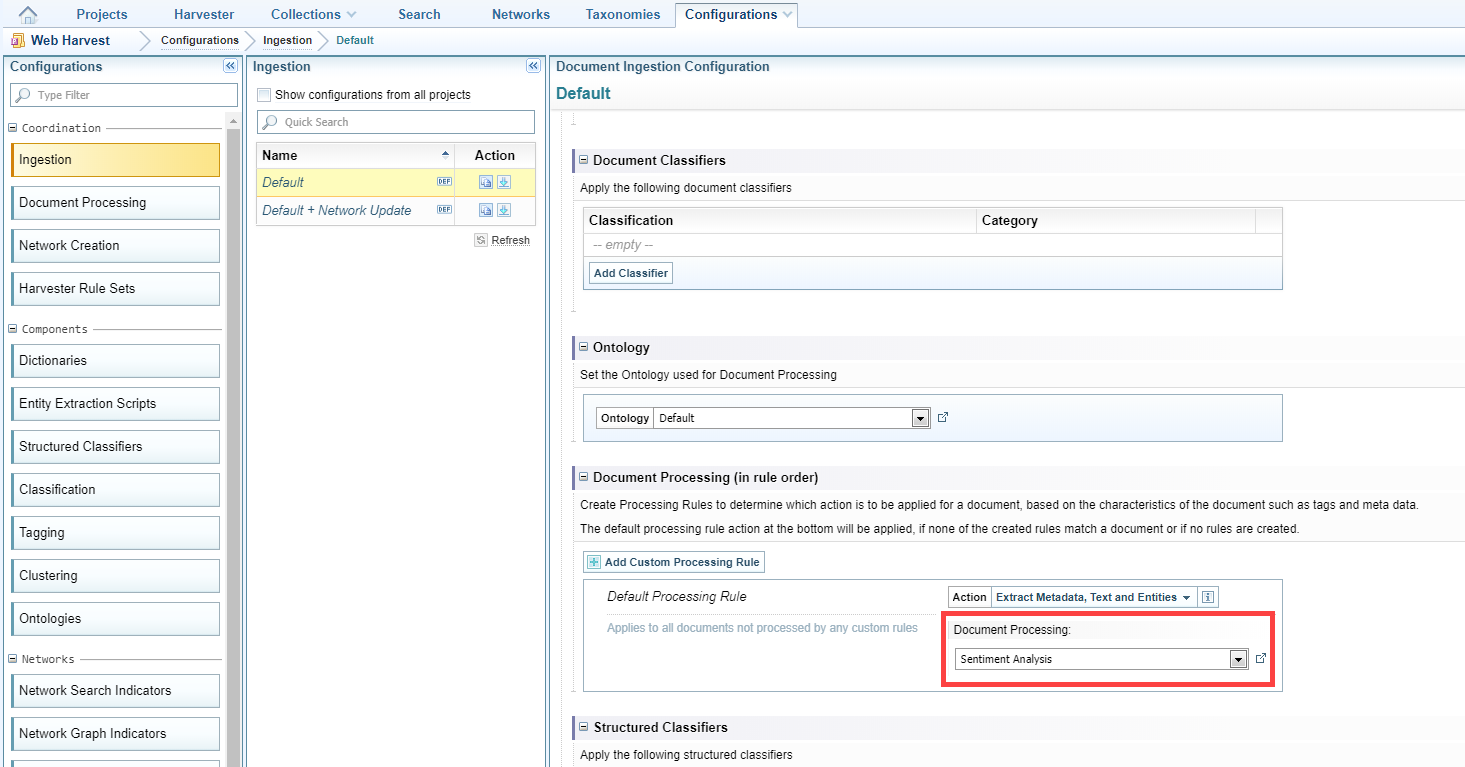
- Make sure that, in the Document Processing (in rule order) section of the ingestion configuration you are using, select the document processing configuration you have set up for sentiment analysis (from the previous step).
- If you have created a custom dictionary of sentiments, make sure you have added it to the Dictionaries (Early Stage) section of the document processing configuration.
- Do one of the following:
- If you have not yet ingested the documents on which you want to perform a sentiment analysis, ingest them (for help see Add (Ingest) Documents).
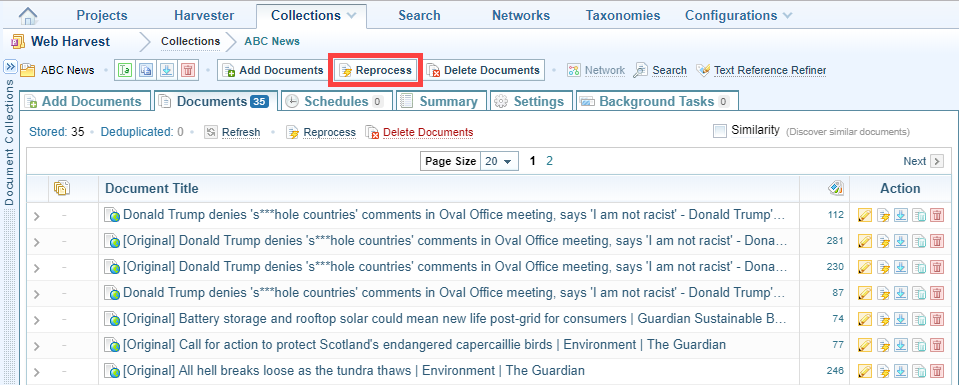
- If you have ingested the documents, click Collections on the Main Navigation Bar then select the collection on which you want to perform the sentiment analysis. Click Reprocess.
- To view the results of the sentiment analysis, do one of the following:
- Select a document in the collection. Positive and negative sentiments are marked.
- Create a network based on the collection, selecting positive and/or negative sentiment nodes and links.