Annotations
Annotations provide information about a span text.
Annotations have a label and have features providing information about the text.
For example, to understand the text, the grammatical building blocks such as parts of speech, phrase chunks and sentences can be identified, annotated and examined to determine meaning. Text references in Documents is a type of annotation.
The beginning and end of an annotation is identified using the Text Graph.
When are they created
Annotations are created during entity extraction. There are annotations that are created by Sintelix by default.
Dictionaries and Entity Extraction Scripts (EES) create annotations. EES can create connections (links) between annotations. EES can use annotations created by Sintelix, Dictionaries and other EES.
Namespace
Annotations are grouped and given a label, referred to as a namespace.
In this example, the namespaces shown are default, chunk, lookup and pos.
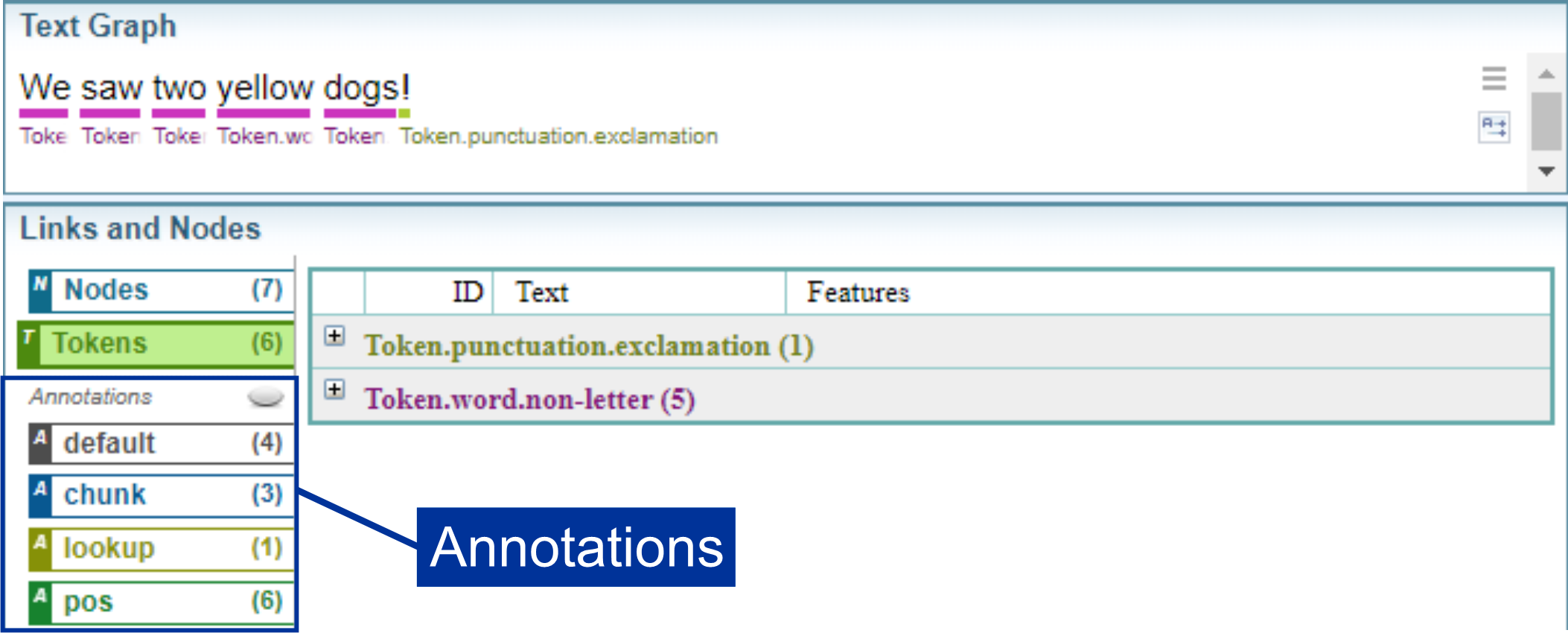
The chunk annotation is only created when the option is enabled in the Document Processing configuration.
When you add additional annotations during entity extraction, when Dictionaries and Entity Extraction Scripts (EES) are applied, more namespaces can be created. Dictionaries and EES can assign custom namespace labels.
Tag namespace
Annotations with the namespace label "Tag" will be displayed in Documents as Text References, highlighted with a colour.
The Text Graph Analyser topic provides a video to demonstrate the behaviour of the Tag namespace and other annotations.
Text Graph Analyser
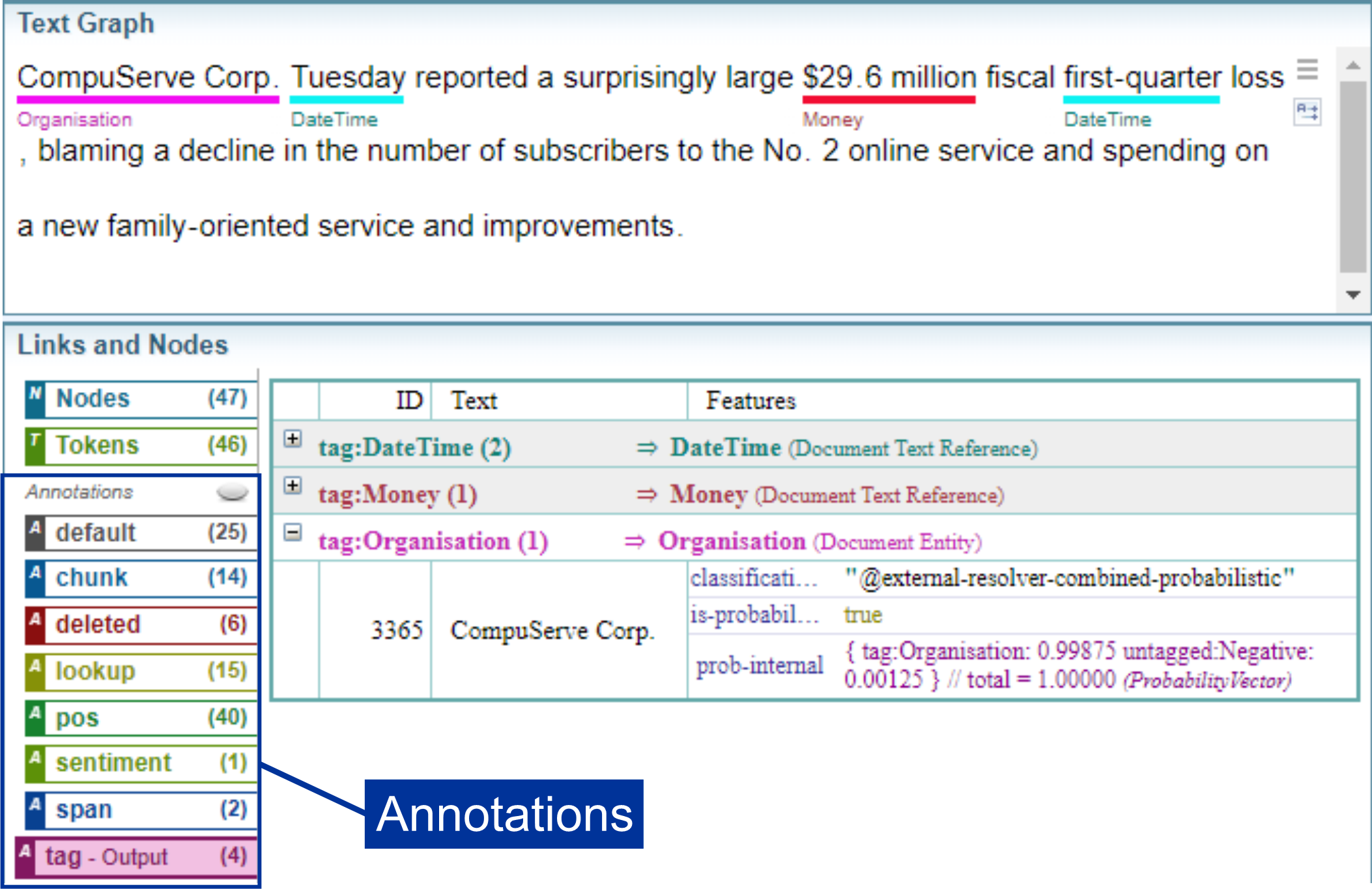
The Text Graph Analyser allows you to visualise and explore the Text Graph and Annotations applied to text.
The diagram below shows a sentence displayed in the Text Graph Analyser, which shows a breakdown of the Text Graph and the annotations applied to the sentence. The Text Graph Analyser is an powerful tool that is used to edit and test Dictionaries and EES.
Common Annotation Namespaces
The table below summarises the annotation namespaces commonly created during entity extraction.
| Namespace | Description |
|---|---|
| default |
identifies the core language building blocks:
|
| chunk | identifies the phrase chunks (e.g. noun phrases, verb phrases, etc.) |
| deleted | Indicates where Sintelix has checked if text complies with lookup or annotations and deleted them when finding they were either not valid or superceded by another annotation. |
| lookup |
Annotations under the "lookup" namespace are added automatically by the Sintelix Lookup Module. This module contains a database of phrases of interest. |
| pos | Identifies parts of speech. |
| sentiment | Identifies the sentiment of words. |
| span | Generated by the system. |
|
tag |
Identifies Text References added by :
Annotations with the namespace label "tag" will be shown in Documents as Text References. |
|
wordlist |
Identifies annotations add by Dictionaries and EES without a namespace label. That is, if you create an annotation without giving it a namespace label, it will default to the wordlist namespace. |
|
<custom> |
Identifies annotations add by Dictionaries and EES with a custom namespace label. |
Default Namespace
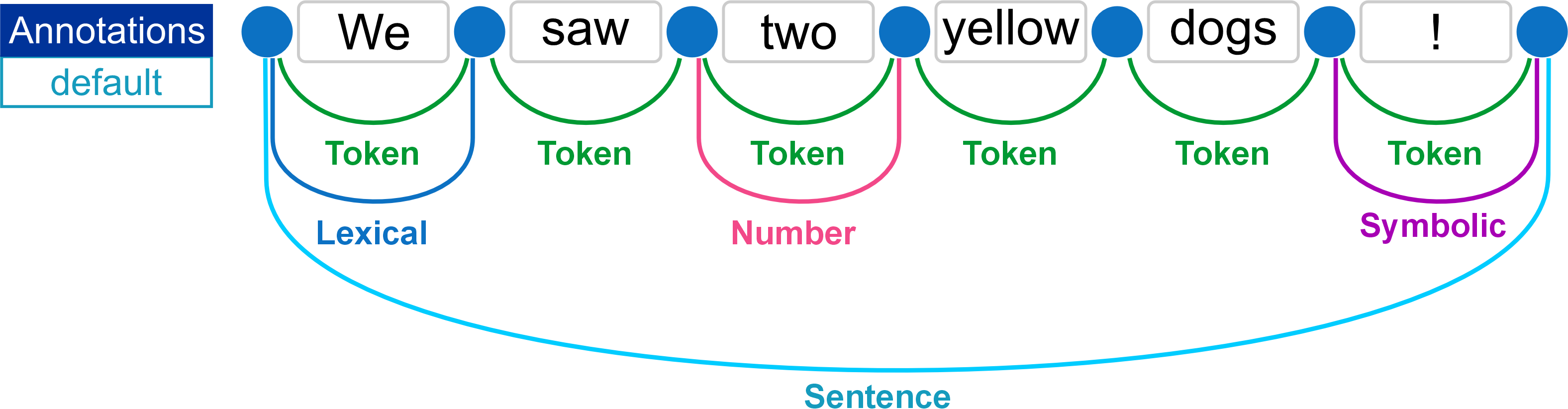
The example below illustrates the default language building blocks annotated on the text graph:
Text Graph Analyser: Default Annotations
The diagram shows the default annotations in the Text Graph Analyser.
Annotations: Parts of Speech (pos)
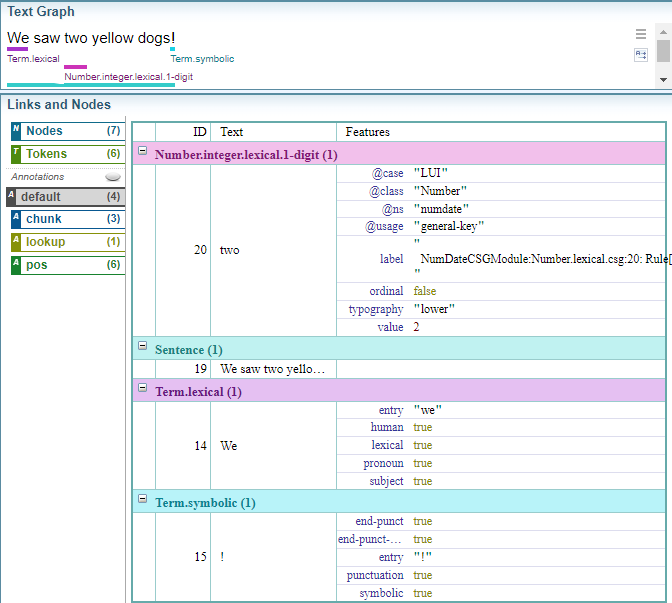
The example below illustrates the parts of speech (pos) annotated on the text graph:
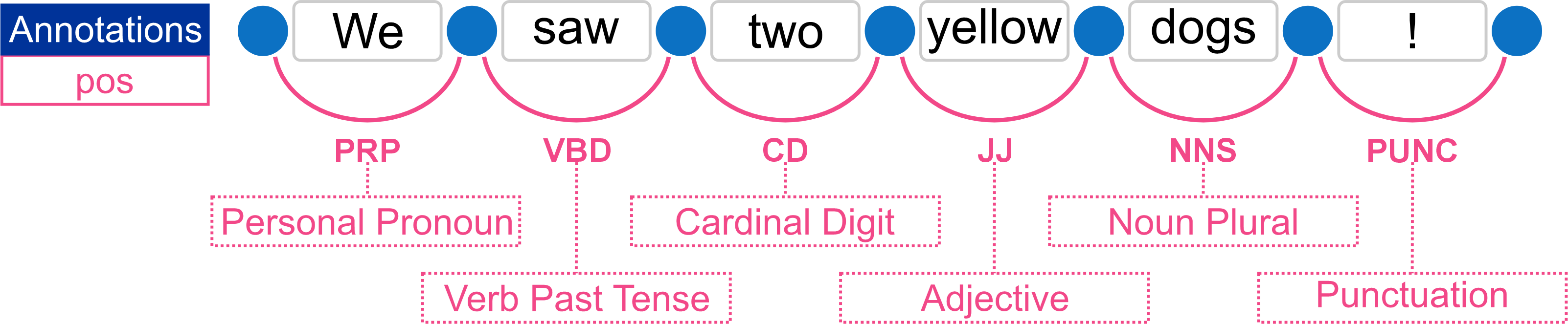
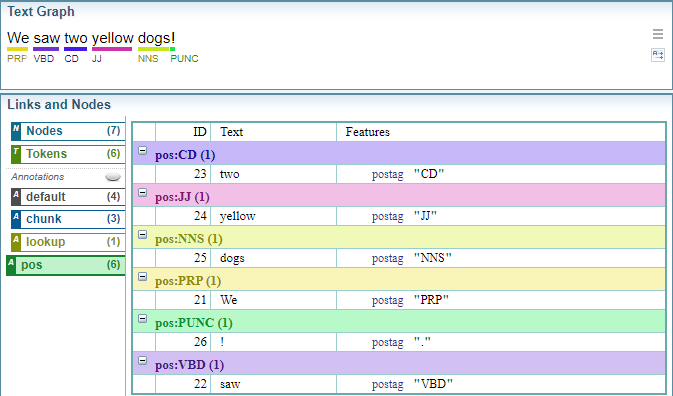
Text Graph Analyser: pos Annotations
The example below shows the parts of speech (pos) annotations in the Text Graph Analyser.

Revision: Parts of Speech
Below is a quick revision of the primary parts of speech, as a little revision.
There are nine principle parts of speech:
| Part | Description | Examples |
|---|---|---|
| Nouns | Name of a place, thing or idea | lady, road, tree, love, dream, pencil, Bob |
| Pronouns | Take the place of a noun | he, she, it, you, we |
| Verbs | Express action or a state of being | ran, flew, trips, was, is, showed, jumps |
| Adjectives | Describe a noun | new, shiny, fat, thorough, funny |
| Adverbs | Describe or modify a verb, adjective, or another adverb | quickly, repeatedly, precisely (often end in -ly) |
| Prepositions | Establish a relationship between the noun and the rest of the sentence | over, around, through, during, according to, above, beside |
| Conjunctions | Connect words, phrases and clauses | and, but, or, nor, however, moreover |
| Interjections | Express surprise or other emotions |
Ouch! Eek! Ow! (often have an exclamation point) |
|
Articles |
Help define nouns |
the, an, a |
pos codes
The table below lists the parts of speech (pos) codes.
|
Abbreviation |
Meaning |
Example |
|---|---|---|
|
CC |
coordinating conjunction |
and |
|
CD |
cardinal digit |
1, third |
|
DT |
determiner |
the |
|
EX |
existential there |
there is |
|
FW |
foreign word |
les |
|
IN |
preposition/subordinating conjunction |
in, of, like |
|
JJ |
adjective |
green large |
|
JJR |
adjective, comparative |
greener larger |
|
JJS |
adjective, superlative |
greenest largest |
|
LS |
list marker |
1) |
|
MD |
modal |
could, will |
|
NN |
noun, singular |
cat, tree |
|
NNS |
noun plural |
cats, trees |
|
NNP |
proper noun, singular |
American |
|
NNPS |
proper noun, plural |
Americans |
|
PDT |
predeterminer |
all, both, half |
|
POS |
possessive ending |
parent's friend's |
|
PRP |
personal pronoun |
I, he, it |
|
PRP$ |
possessive pronoun |
my, his, our |
|
PUNC |
Punctuation marks |
. , ! ? |
|
RB |
adverb |
little, quietly, however, usually, hard |
|
RBR |
adverb, comparative |
less, more quietly, harder |
|
RBS |
adverb, superlative |
least, most quietly, hardest |
|
RP |
particle |
about, across, through, in, out, over |
|
SYM |
Symbol |
/ { = * |
|
TO |
infinite marker |
to |
|
UH |
interjection |
goodbye |
|
VB |
verb |
ask |
|
VBD |
verb past tense |
was, were, pleaded |
|
VBG |
verb gerund |
being, pleading |
|
VBN |
verb past participle |
been, reunified |
|
VBP |
verb, present tense not 3rd person singular |
am, are |
|
VBZ |
verb, present tense with 3rd person singular |
is |
|
WDT |
wh-determiner |
which |
|
WP |
wh- pronoun (who) |
who, what |
|
WP$ |
Possessive wh-pronoun |
whose, whosever |
|
WRB |
wh- adverb |
when, where, why |
Annotations: Chunks
The chunk annotation identifies the phrases within a sentence, which are derived from the parts of speech. The example below illustrates the both the parts of speech and chunks annotated on the text graph:
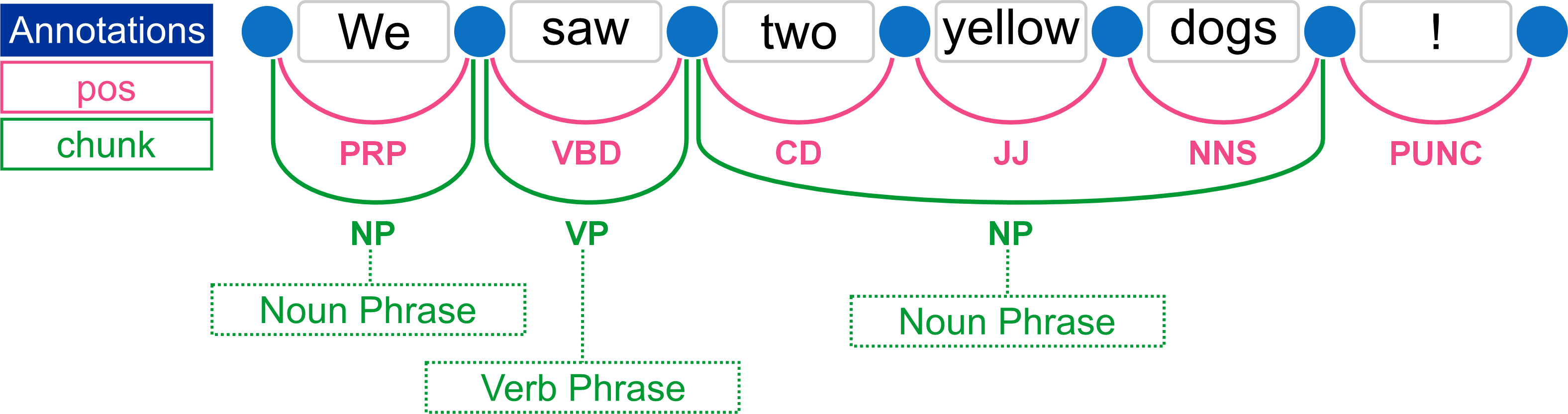
Chunk annotations are only created if the Document Processing configuration has the Enable Chunker checkbox selected. See Phrase Chunker.
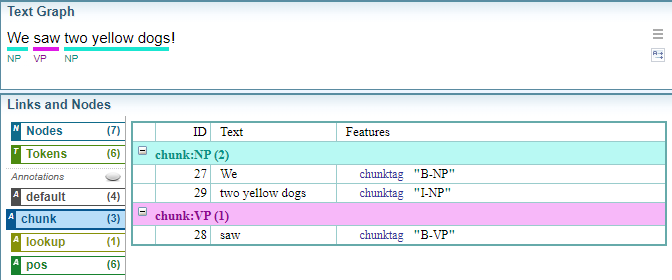
Text Graph Analyser: Chunk Annotations
The example below shows the Chunk (phrase) annotations in the Text Graph Analyser.
chunk codes
The table below summarises the chunk codes.
|
Annotation |
Description |
|---|---|
|
SBAR |
Clause introduced by a (possibly empty) subordinating conjunction. |
|
ADJO |
Adjective Phrase. |
|
ADVP |
Adverb Phrase. |
|
CONJP |
Conjunction Phrase. |
|
INTJ |
Interjection. Corresponds approximately to the part-of-speech tag UH. |
|
LST |
List marker. Includes surrounding punctuation. |
|
NP |
Noun Phrase. |
|
PP |
Prepositional Phrase. |
|
PRT |
Particle. Category for words that should be tagged RP. |
|
UCP |
Unlike Coordinated Phrase. |
|
VP |
Verb Phrase. |