View Neighbours in Nested Tables
Quick Summary
When viewing a Node Table, you can easily view the entity neighbours by selecting the  List Neighbours option.
Once you have selected which neighbours to view, the results are displayed in a nested table.
Click on the video to open in a new tab.

Nested Tables
-
You can sort and filter a nested table.
-
A nested table is read-only.
-
You can have nested tables within nested tables.
-
The Table View displayed for the nested table is based on the default table view for that entity/link (set in the Ontology - Assign Default Forms and View Settings ).
View Neighbours
To view neighbours in a nested table:
-
Select the
List Neighbours option from the Action menu.Result: A list of neighbours for that entity is displayed, for example:
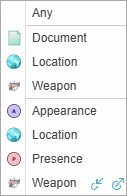
-
 incoming, and
 -
 outgoing links.
 -
Select the neighbour you want to view.
Result: The matching neighbours are listed in a nested table below the entity.
-
To close a nested table, select the Close button
 .
.
If a link has a Link Direction, you can choose between: