Network Table Views
Access
To access the Network Table View:
-
Select the Networks tab
-
Select a network
Result: The default or last selected Node Table will be displayed.
-
Select a:
-
node type (entity) to View the Node Table, or
-
select a Link type to View the Link Table.
-
Features and Shortcuts
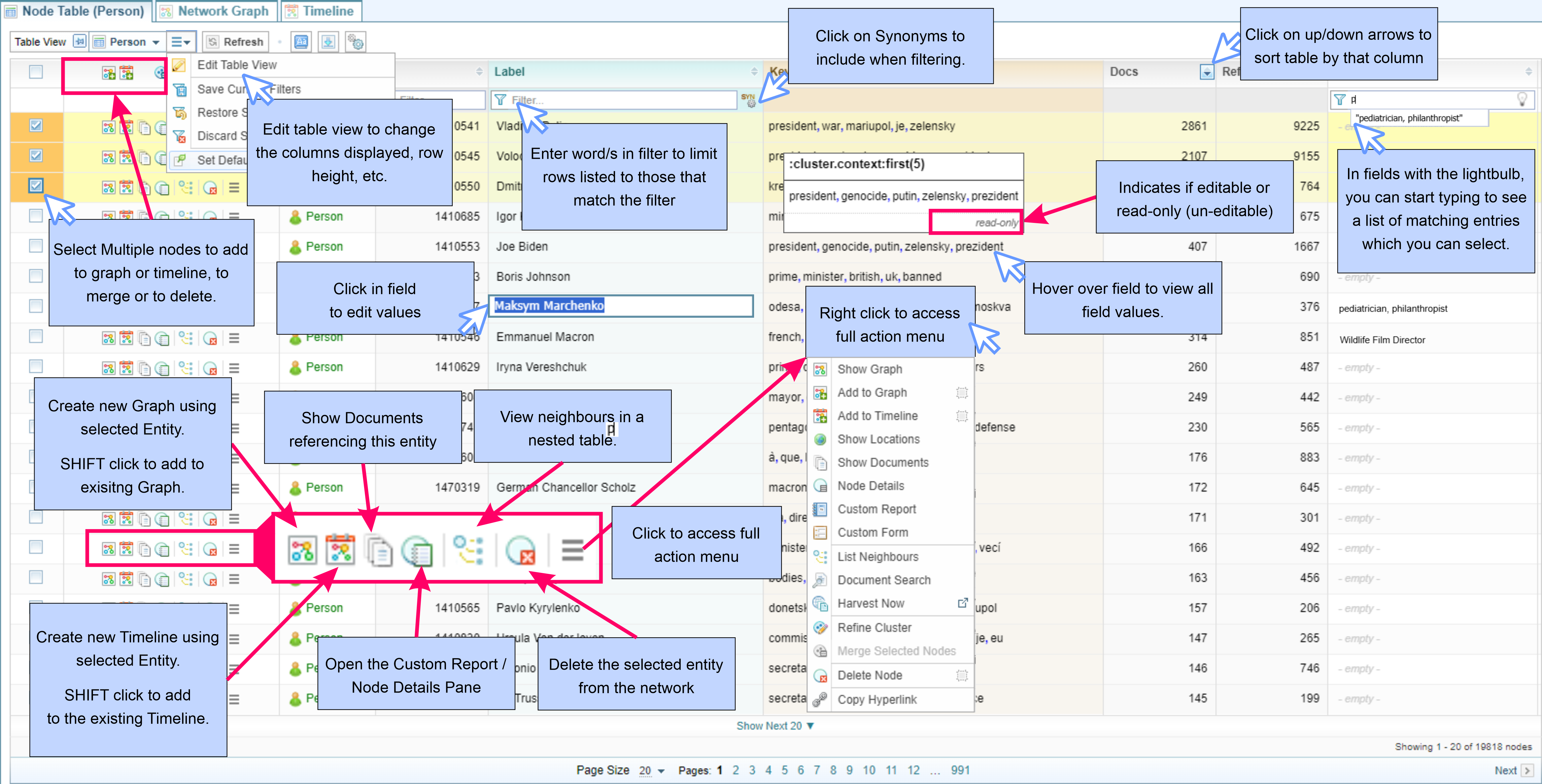
The diagram below quickly summarises some of the features and shortcuts when viewing Network Tables.
Configurations
The Node type selected by default when a network is selected is set in the Network Creation configuration, see Default Node Type (optional).
What you can do
Once you have selected a Node or Link in the Overview pane, the Network Table View is displayed.
From the Network Table View, you can:
- Filter and sort the views (see Filter and Sort Network Tables)
- View a node's neighbours in nested tables (see View Neighbours in Nested Tables)
- Edit the entries (see Edit Features and Fields)
- Select and Edit the Node Table Layout (see Network Table Views and Layout)
- Access the Action menu to analyse the contents of the Network Table:
- add the node/link to a Network Graph
- add the node/link to a Network Timeline
- show locations on a map
- view documents referencing the node/link
- view the node/link details
- merge, refine or delete nodes/links.