Harvest Documents
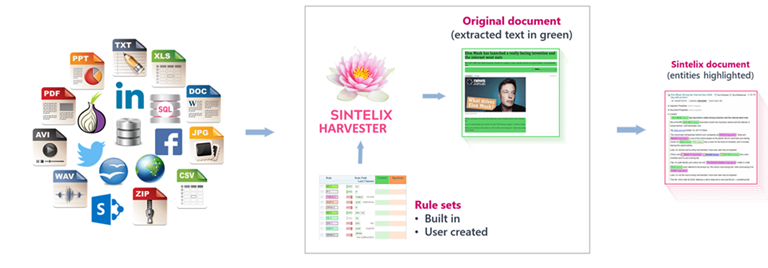
What is the Harvester?
The Sintelix Harvester can collect content from the web.
The content is added to a collection and processed as a Sintelix document.
Features
Features:
- Sintelix Extension: You can Harvest from the Harvester tab or using Sintelix Extension. See Harvest via Sintelix Extension.
- Adblocker: To reduce unnecessary downloads.
- Dark Web: The Harvester can be used to extract text from .onion sites using Tor. See Harvest the Dark Web.
Requirements
Harvester requires a connection to a Sintelix Agent and Internet connectivity.
To check the Harvester status, select Harvester > Agent tab.
What you can do
Sintelix offers a number of methods for Harvesting from web pages. You can:
-
harvest manually, using the Sintelix Extension, where you can select elements to include. See Harvest via Sintelix Extension
-
harvest automatically, from the Harvester tab, using defined Rule Sets to automatically select the elements from a page to collect and analyse.
You can Create a Harvest Query to:
-
harvest via search engines, or
-
harvest via URLs.
You can also:
-
Manage Personas to log in to restricted sites
-
Harvester pane
When you select the Harvester tab, the following panes are displayed.
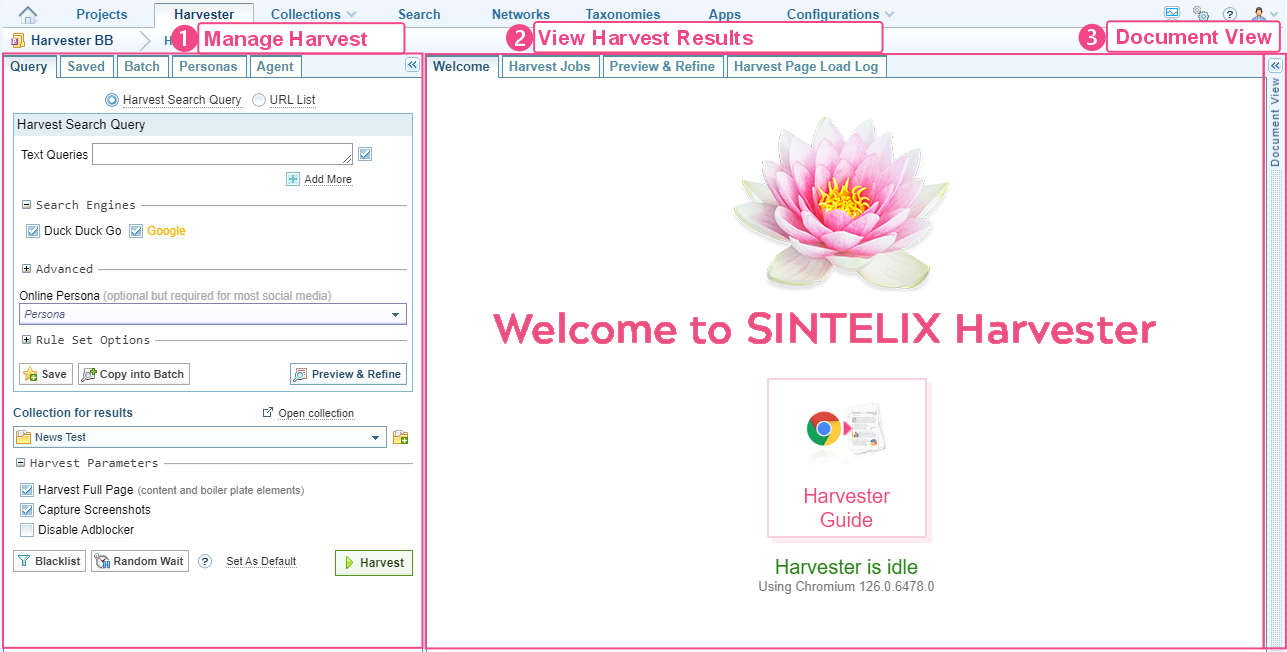
Harvester tabs
The table below describes what function each Tab performs.
| Query (default) |
Define a Harvest Job based on a search or URL list. |
| Saved |
List of saved queries, which can be quickly opened in the Query tab. |
| Batch |
Schedule queries to run automatically. See Schedule a Harvest. |
| Personas |
Save login credentials to access protected sites. See Manage Personas. |
| Agent | Displays the status of the Agent. |
| Welcome (default) | Displays the status of Harvester. |
| Harvest Jobs |
Opens when a Harvesting job is started. Displays the progress of each page being harvested. See View Harvest Jobs. |
| Preview & Refine |
Opens when you select from the Query tab. Allows you to preview the query results without running a full Harvest job. You can select URLs to exclude from the Harvest for the:
|
| Harvest Page Load Log |
Displays a log record of each page harvested, including its status, the Rule Set applied and a link to the web page. |