Key Concepts
There are several key concepts and terms it is useful to understand when using Sintelix.
Process Diagram
While Sintelix can be used in different ways, the process is generally similar.
The following diagram summarises the Sintelix process, highlighting some of the key terms:
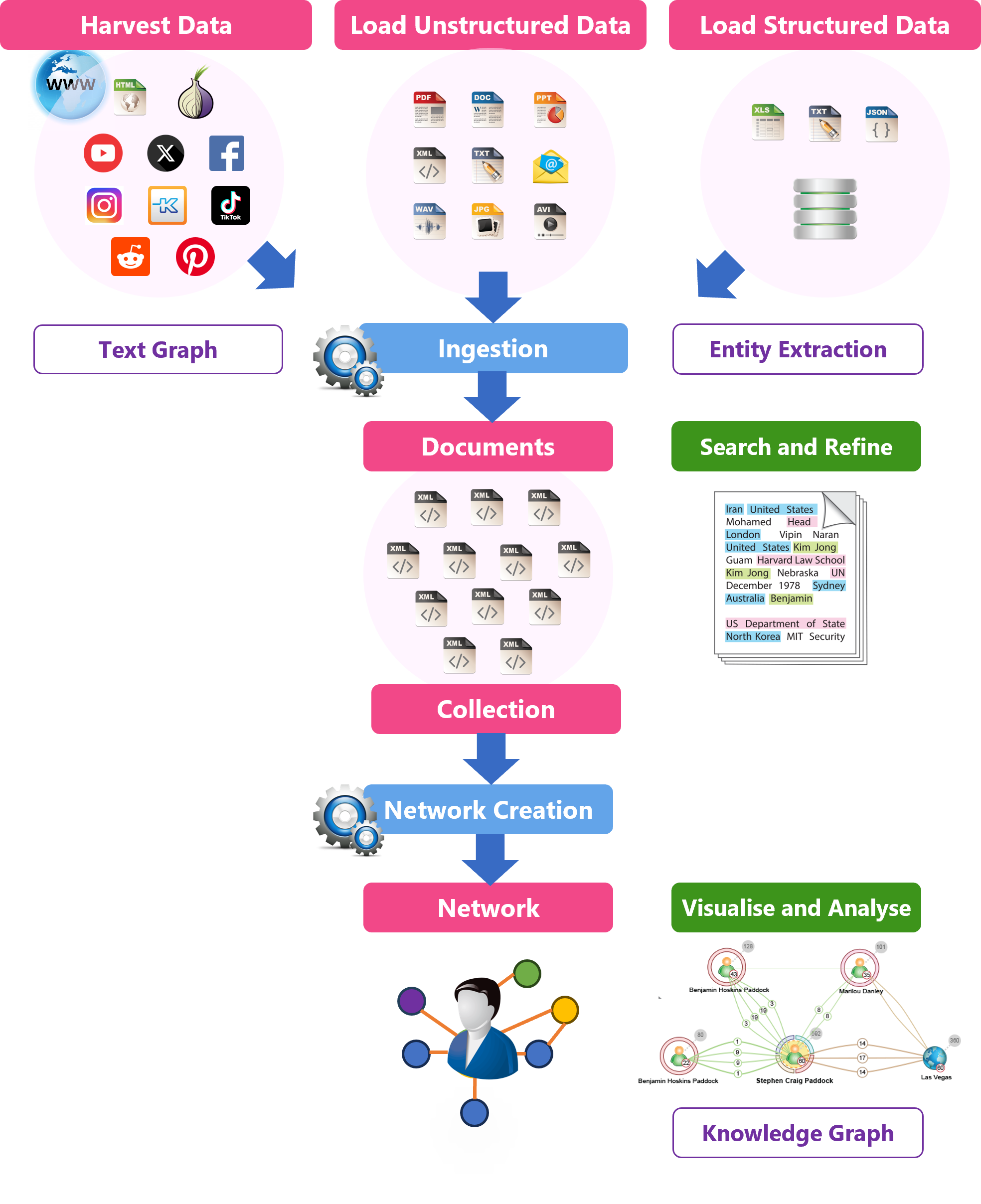
Source Files
Source Files: You add source files you want to analyse. A wide range of file formats can be added.
Harvest
Harvest: You can add documents to Sintelix by harvesting pages from websites, such as social media sites and the dark web.
See Concept: Harvesting.
Load Unstructured Data
Unstructured data can be loaded from a wide range of sources including over 1600+ formats. For example, Word, PowerPoint, PDF, etc.
Load Structured Data
Structured data can be loaded from a range of sources, including Excel, Delimited Text files (e.g. csv), Fixed width text files, JSON and databases.
Ingestion
Ingestion: As source files are added or harvested they are ingested.
How they are ingested can be configured (customised).
Ingestion involves several stages, including:
-
converting source files added or harvested into standardised text Documents.
-
running Entity Extraction to identify Entities, Text References and Connections.
-
creating a Network (optional) to cluster Entities across multiple Documents into a unique Node and the associated Connections into Links between Nodes.
Documents
Documents: The source files added or harvested are converted into standardised XML Documents and are stored in Collections. See Concept: Documents.
-
A Document is organised into sections, including at least Ingestion Properties, Document Properties, Document Tags and Content.
-
Entity Extraction is applied to the text in the Content section of each Document using a Text Graph, Tokens and Nodesto analyse the text and to add Annotations, including Text References and Connections between Text References.
-
You can Edit a Document to refine the Entities, Text References and Connections.
Entity Extraction
Entity Extraction analyses the text in the Content section of each Document and marks up Text References and Connections (between text references) within a Document.
Text References and Connections can have Features added, where each feature has a name and a value, providing additional information about the Text Reference/Connection.
Entity Resolution groups:
-
related Text References into a unique Entity
-
Connections between Text References into a unique Entity Relation (or relationship)
-
The Ontology configuration defines which types of Text References become an Entity (or simply remain as a marked-up Text Reference in the Document).
Collections
Collections: Once ingested, Documents are saved into a Collection.
A Collection is simply a way of grouping related Documents together.
-
You can search the Collection based on text, entities, and other settings.
-
You can ask Sintelix a question and get it to find the answers.
-
You can analyse the Text References across all documents in a Collection to refine the markups.
-
You can create a "Gold Standard" collection (with the markups exactly as you want ingestion to achieve) and compare it to a Test collection marked up using the Ingestion configuration to test the effectiveness of the Ingestion configuration.
-
Documents in a Collection can organised into a Taxonomy structure (based on classification and tagging) providing a flexible method of organising and browsing Documents.
Network
Network: A Network is created by clustering (grouping) similar Entities and Entity Relations marked up across all the Documents stored in a Collection. How a Network is created can be configured (Network Creation). See Concept: Networks
-
Entities (with their Features) become Nodes
-
Entity Relations (with their Features) become Links in a Network.
-
Documents can also become Nodes in the Network (depending on the Network Creation configuration).
-
When forming Nodes and Links, their Features can be processed (combined, calculated, etc.) to become Fields associated with the relevant Node or Link.
-
The Network of Nodes and Links are stored in a Knowledge Graph.
-
You can visualise, explore and analyse the Network of information using tables, graphs, timelines and maps.